
Multi-currency Support is Live!

One of the most powerful things about eCommerce is the ability to sell to customers all around the world. Yet one of the most challenging aspects of that is dealing with all the different currencies and the record keeping that comes with that.
Fortunately, Seller Ledger is excited to announce the availability of multi-currency support for eCommerce merchants.

The challenges
To help illustrate the financial complexity, let’s take the example of a North American Amazon seller. When you sell on Amazon to customers in Canada and Mexico, Amazon treats all of those transactions separately from your US-based sales. They issue payouts for those sales (minus expenses) in their native currencies. They also provide their “Activity reports” in those native currencies. This creates a couple of interesting challenges:
1. Reconciling payouts to bank deposits
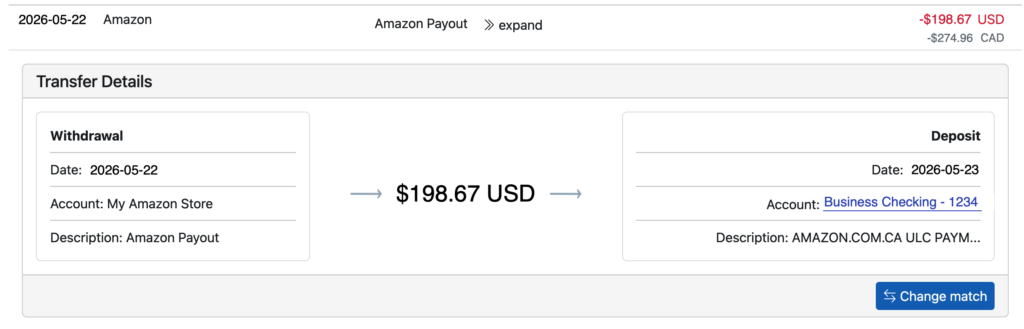
Even though Amazon issues payouts in their native currencies, when they hit your bank account, you will see them show up in US dollars. But how do you know which deposit goes with the corresponding payout from Amazon? How do you reconcile a payout of $2,316.43 MXN to a deposit of $123.80 USD?
2. Reporting on your business in a single currency?
Even if you can figure out how to match foreign currency payouts to US dollar deposits, how do you look at a single profit and loss statement (or other financial report) that shows an apples-to-apples comparison of sales and expenses?
Automate your eCommerce bookkeeping with Seller Ledger.
How Seller Ledger handles foreign currency transactions
Seller Ledger now uses currency exchange rates to translate foreign currency amounts to US dollars. To see this in action, simply click into your account from the dashboard and scroll down to any non-US transactions, and you’ll see them in both USD and the original native currency underneath:

And when you find a payout, we provide you with even more details. Click “expand” next to a payout that you see in your marketplace account and you’ll see it matched to a deposit in your linked bank account:
What about differences from the exchange rate?
That’s an excellent question and we’re so glad we brought it up. Because exchange rates change all the time, and Amazon doesn’t provide the exact rate used at the time of each transaction, we use the daily “spot rate” to convert amounts from their native currencies to US dollars. And discrepancies end up going under a new category: Foreign Exchange Gain or Loss. This category rolls up to Line 27a: Other expenses on the Schedule C tax form. It will show as a negative number if you lost money overall on the conversion (and as a positive number if you were fortunate enough to benefit from the conversion).
To learn more about foreign exchange math, feel free to do some research on Section 988 of the Internal Revenue Code.
All included…at no additional cost
Unlike some other accounting platforms, who may require a higher tier to access multi-currency, raise prices frequently and STILL require you to use a third party connector like A2X in order to handle the reconciliation, Seller Ledger just handles it within the software, at the same price as your normal plan. No forced upgrades. No additional software subscriptions. Just a single, affordable solution. So decide for yourself which accounting software works best for Amazon sellers.
Ready to automate your eCommerce bookkeeping?
Join thousands of sellers who save hours every month with Seller Ledger.
No credit card required