In our continued efforts to make it easier for customers to track their inventory costs, we now offer the ability to assign costs to multiple items after they sell.
How do I assign costs to multiple items?
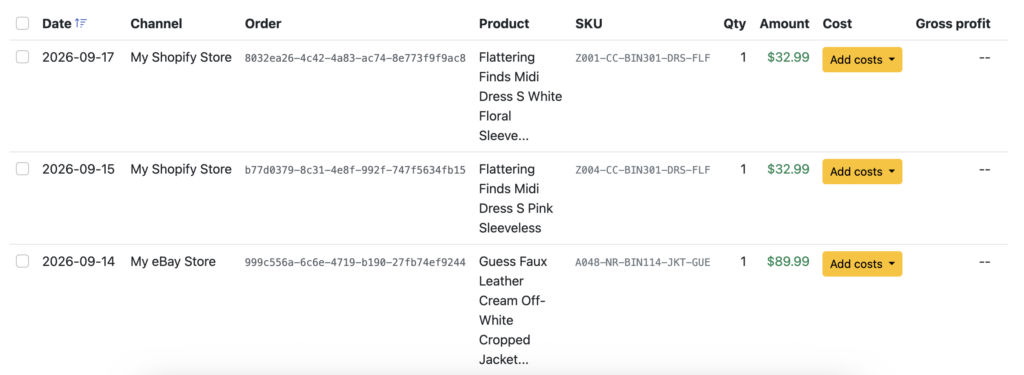
For both periodic and continuous inventory trackers, simply go to the Inventory -> Sold view, which has been redesigned. This screen allows you to add costs to items after they have sold, which we have offered for a while. But now, there’s an additional option.
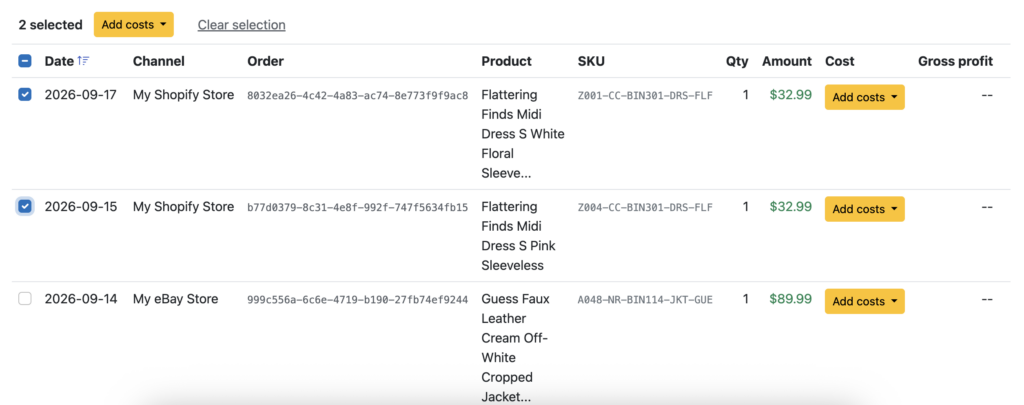
To add costs to multiple items, check the boxes in the left column and click the “Add costs” button at the top:
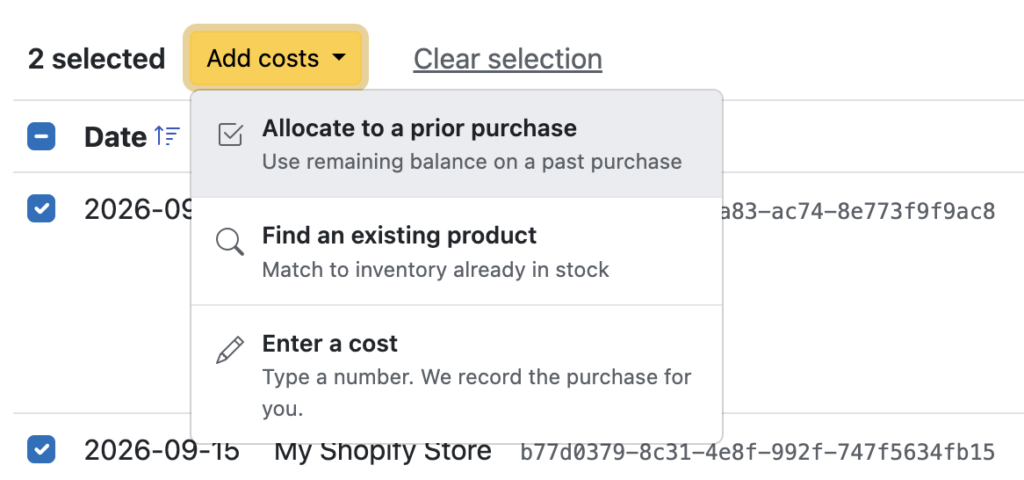
Clicking that button brings up a list of options for how you’d like to handle those costs:
For sellers with large transaction volumes, this should speed up the process of updating your cost of goods..
Ready to automate your eCommerce bookkeeping?
Join thousands of sellers who save hours every month with Seller Ledger.
With all the recent simplifications and improvements we’ve been making to inventory tracking in Seller Ledger, it’s time to roll out something that many sellers have been asking for: the ability to track cost of goods sold for product bundles and kits.
If you use continuous inventory tracking in Seller Ledger, you likely already have the individual costs of various items you have listed for sale.
But what if you decide to offer several of those items for sale in a bundle, at a discounted price?
If that bundle sells, how do you remove the multiple individual items from inventory and make sure they show up in cost of goods sold?
And then how do you look at profit for that bundled order, or those individual items?
Fortunately, Seller Ledger now helps you with all of this.
Tying a bundle sale back to its underlying products
To link a sold product bundle with its individual items, simply go to Inventory -> Sold, find the sale for the bundled product, and click “Add costs”.
You’ll see a new option in the list, called “Match multiple items”. Click that option to bring up a dialog box where you can select and add each item from inventory that belongs in that bundle.
Click “Save” and Seller Ledger will remove those items from inventory and update your cost of goods sold total.
See your profit per order
Now, when you go back into your marketplace account, click “Expand” on the bundled order. You’ll see how much money you actually make on that order.
A lot of sellers would love to see how much profit they make on each product, but aren’t so excited to track every inventory purchase from acquisition through sale.
To help those customers, we’re pleased to announce a new option that allows any seller to simply type in item costs and see their profit on any sale, after it’s already been made.
How can I enter my item costs?
To be able to take advantage of this feature, you do need to turn on inventory tracking. While you will technically be using the “continuous” inventory approach, you can skip a lot of the steps.
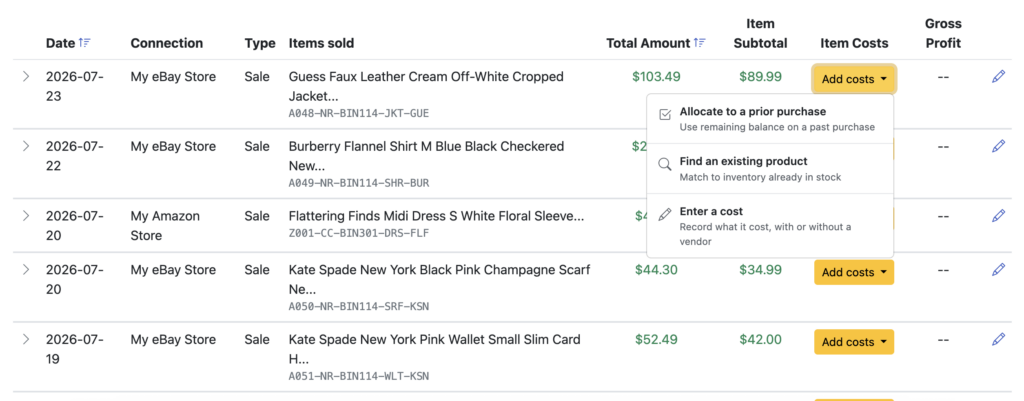
Once you have inventory tracking turned on, simply go to Inventory -> Sold and you’ll see a list of your recent sales, with an “Add costs” button in each row. Click on that button for a sale and choose the bottom option: “Enter a cost”
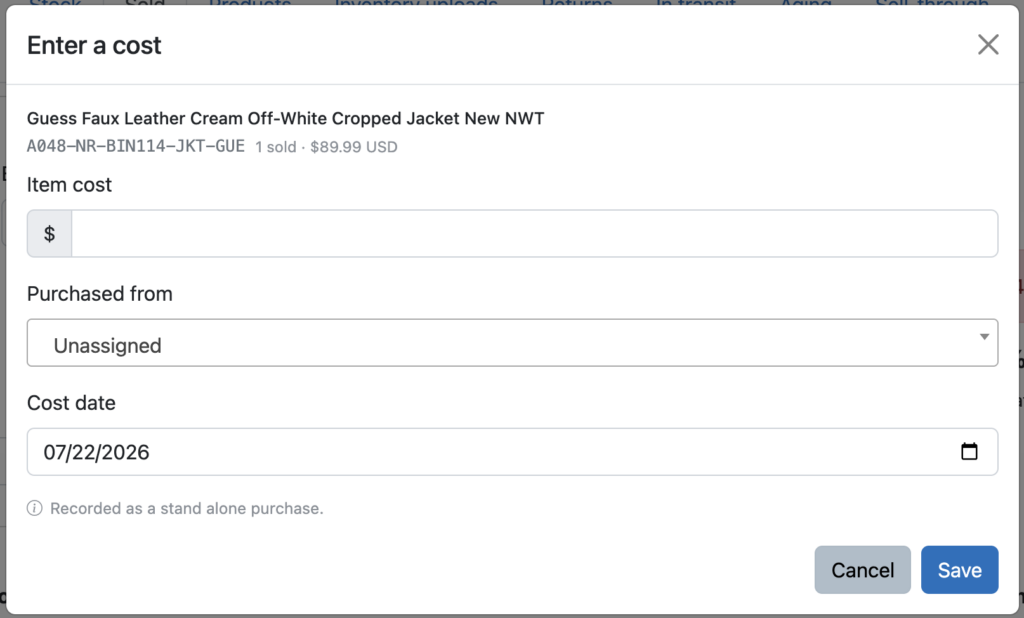
This will bring up a simple form where you can just record the amount you paid for that item, and we’ll handle the rest. You can also assign a specific vendor name and change the purchase date, but it’s your choice. If you want to simply type in the costs of as many items as you can, as quickly as you can – you can now do so.
As soon as you click “Save”, you’ll instantly see your gross profit. And your cost of goods sold will increase by the amount you entered.
Ready to automate your eCommerce bookkeeping?
Join thousands of sellers who save hours every month with Seller Ledger.
If you have built or bought a spreadsheet template for tracking your product purchases and costs, you can now use that to get a jump start on automating your eCommerce accounting and getting better insights into your net profits. Seller Ledger now lets you upload inventory costs from your spreadsheet.
To start, this feature only works if you have inventory tracking turned on and want to see your profits at the item-level. If you are writing off cost of goods sold as you go, you’ll be more interested in just uploading a list of expenses.
However, if you’ve already been tracking each purchase and sale, you’ve made the investment to see your profitability per item.
Update
Since this article was originally published, we’ve released a much more flexible approach to CSV file formats. You can learn more about that here.
How to upload your existing inventory costs from your spreadsheet
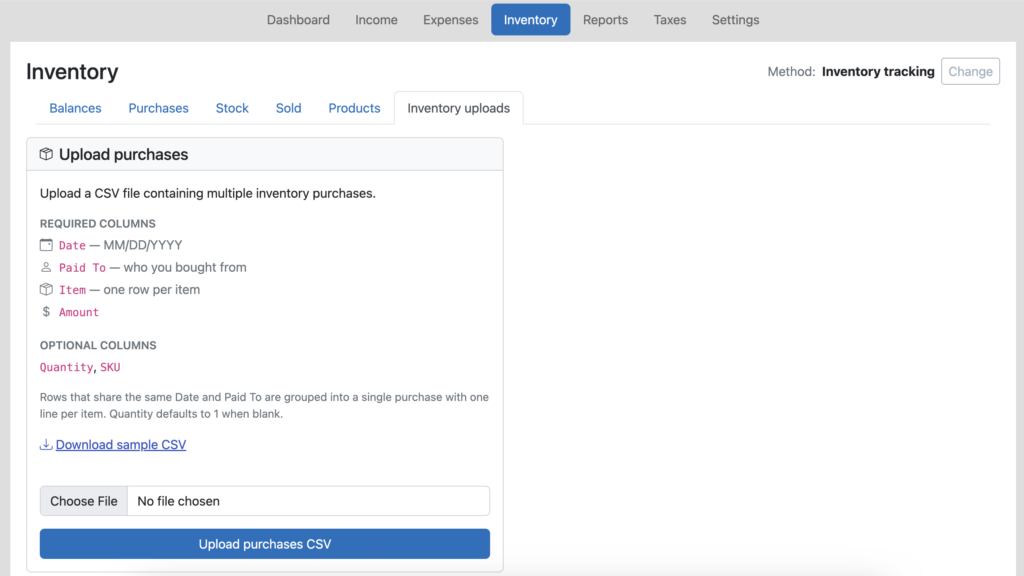
Just go to the Inventory tab in Seller Ledger, and you will see a new “Inventory uploads” sub-tab. Next, open your existing inventory purchase spreadsheet and save it as a new file, in a CSV format. And make sure to rename any of the columns to match our layout.
Pro tip
If you don’t already have unique SKUs for each item in your spreadsheet, we strongly recommend adding them. They are the secret to automating the matching of sales to cost, reducing inventory and calculating cost of goods sold.
That’s it. You’ve just jump-started your switch to a more automated method for tracking your profits on each sale/item.
Ready to automate your eCommerce bookkeeping?
Join thousands of sellers who save hours every month with Seller Ledger.
Perhaps the most important financial metric for any eCommerce business, and one of the hardest to calculate at scale, is the net profit you make on every item sold.
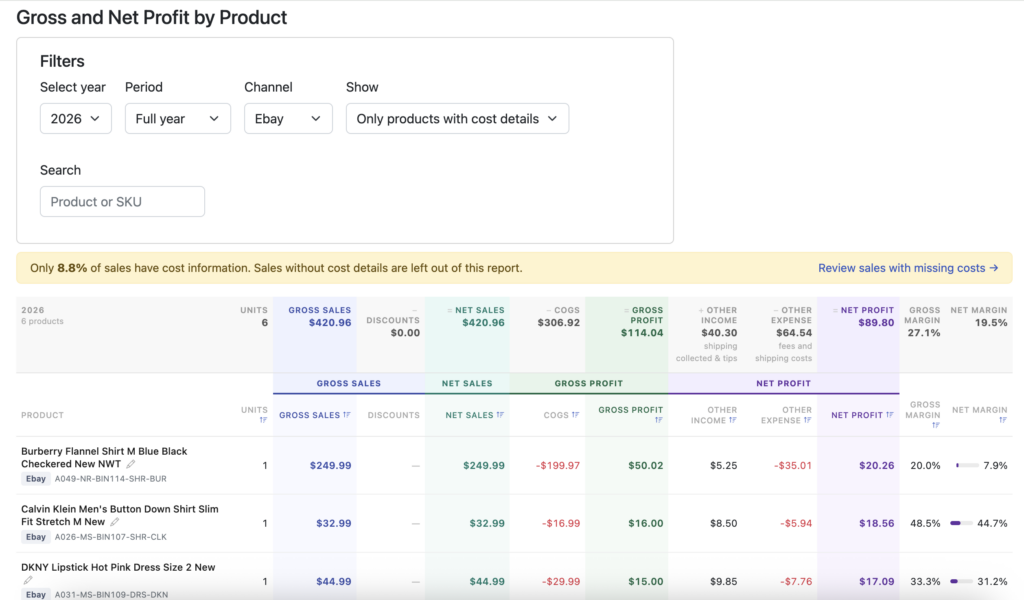
Well, Seller Ledger has just rolled out the “holy grail” of eCommerce reports – the ability to see your profit on each item sale.
Do you know which products are actually making you money?
Net profit per item sale is what you’re left with after subtracting all directly-linked expenses from the income you produce by selling an item. It’s the ultimate bottom line.
But figuring out this number is incredibly difficult, particularly if you sell on more than one channel. You need to account for so many potential numbers, which vary widely by channel:
Sales price
Any discounts offered
Shipping charges you may collect from the buyer
Sales commissions paid to the listing platform
Potential payment processing fees
Advertising/promotion/boosting fees
Potential inventory storage fees
and many more
And while each platform provides these numbers, they are not always presented together in a single view.
Then, there’s what is often the single biggest determination of your profit – cost of goods sold. Most platforms don’t know this, and a lot of sellers prefer not to share it (for good reason – given concerns about platforms using that data against them.)
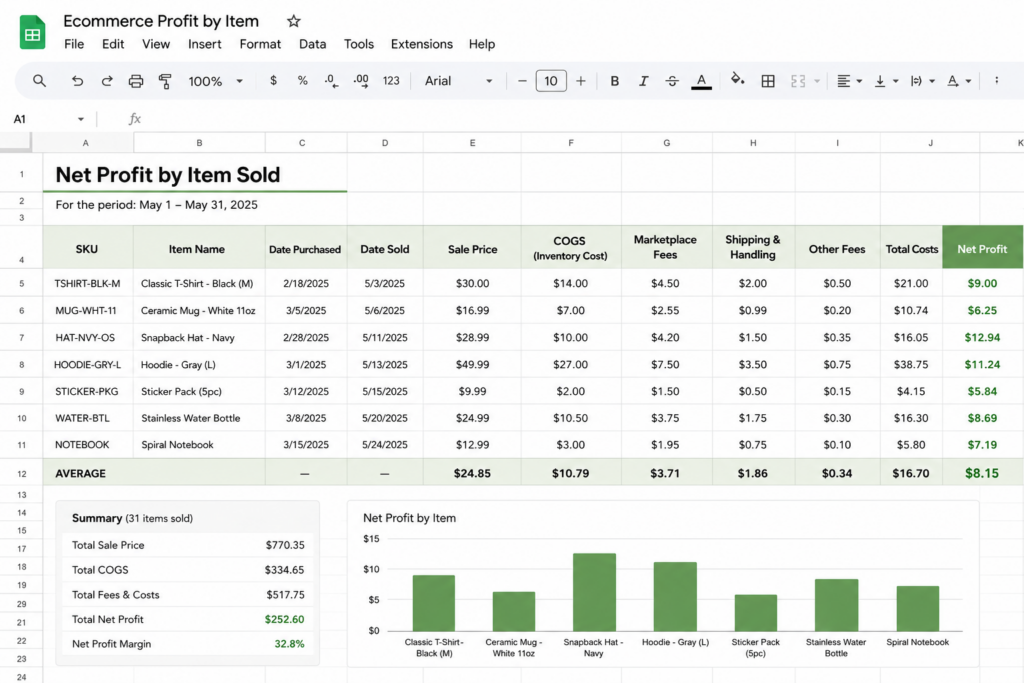
The classic solution—spreadsheets!
Sellers have been using spreadsheets to try to figure this out for decades. In fact, there are lots of experienced sellers and influencers across the web offering spreadsheet templates to help sellers track these numbers.
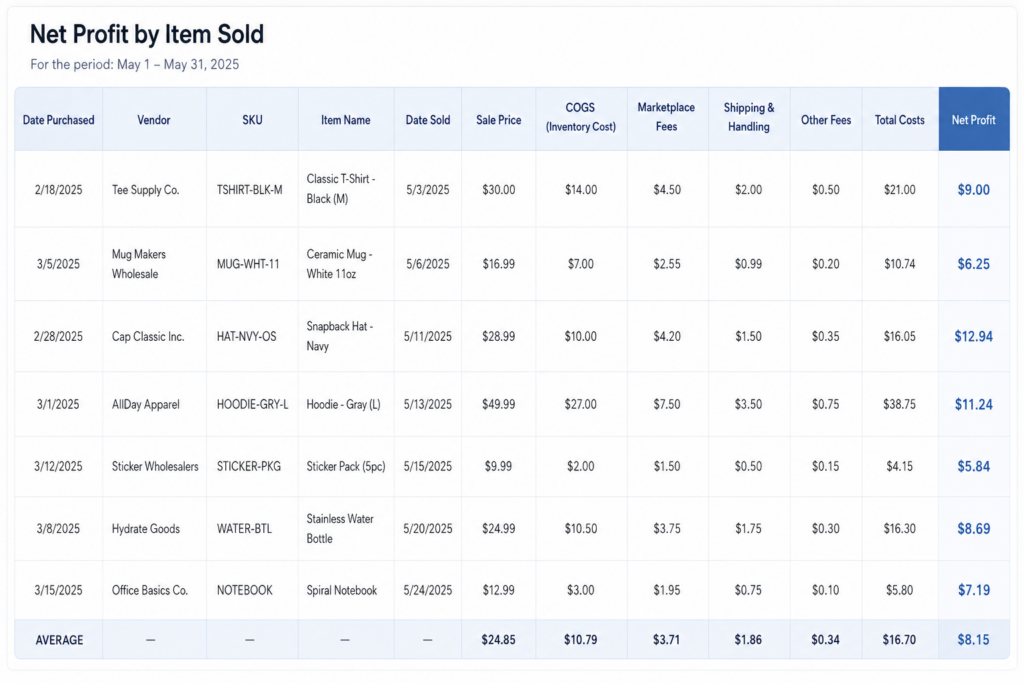
Does this look familiar?
While very good at calculating the numbers you want to see, there is one massive limitation in these spreadsheets: the amount of time to keep them up to date. If only these spreadsheets could update themselves.
Actual profit, for every product, by channel—all in one place
If you go to the Reports tab, you will see a new sub-tab called “Gross and Net Profit”. This replaces and expands the prior “Gross Profit” report. Click into it to see your full profit picture by product.
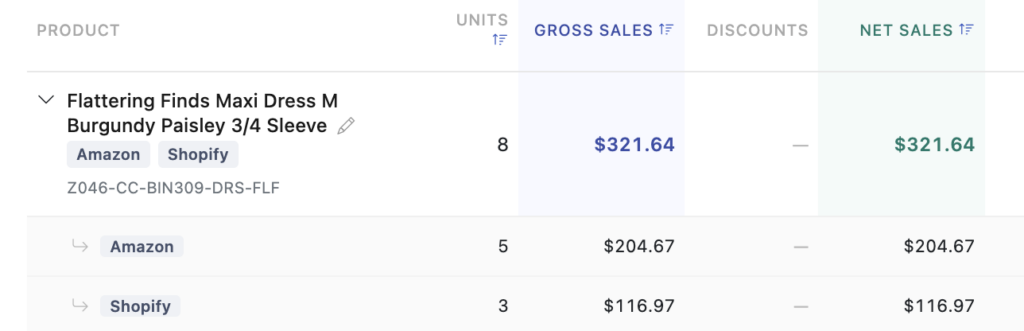
You can view by individual channel or by all of them. If you have sold the same product in multiple channels, you’ll be able to expand that row and see and compare the profit numbers between those channels.
In addition, for those sellers with a LOT of inventory, you can search both by product name and SKU.
What you can do with this information
Knowing how much you make on each item, on each channel, gives you the power to make smarter decisions in your business:
Source better products: You are now armed with the most accurate information on which items generate the most profit. Find more of them.
Spend your ad dollars better: Make sure your advertising/promotional spend is paying off for you
Change your pricing on each channel: You can now factor in all costs from a channel to see if pricing needs to be adjusted.
Allocate inventory differently: Prioritize the channel/product combinations that make you the most profit.
Stop losing money: Identify any products on any specific channels and stop selling them.
How to get the most from this report
In order to get set up to have this information at your fingertips, there a few things that will help tremendously when using Seller Ledger.
Connect your sales channels: first, you need to connect your sales channel/platform to Seller Ledger. You can find our most current list here, and know that it is likely to continue growing.
Turn on inventory tracking: If you are just writing off “cost of goods sold” as you buy inventory, this level of insight won’t be available to you. But if you’d like to get this report, go to the Inventory tab and change your method to “Inventory Tracking.” We’ve also made it very easy to switch back if you prefer not to continue.
Load your item costs into Seller Ledger: Make sure you include unique SKUs for each item. As a reminder, you can add them individually, upload a receipt or even a CSV file.
Include SKU when listing your item: most platforms make this pretty obvious when listing, while others may require an extra step.
Not all platforms support automatic SKU matching
The following connected platforms don’t provide support for SKU fields: Mercari, Depop, Manapool
However, we do provide the ability to match sold items to inventory after-the-fact, so you can still get the insights you need.
Ready to automate your eCommerce bookkeeping?
Join thousands of sellers who save hours every month with Seller Ledger.
To better help you manage the products you sell, Seller Ledger has added a new view under the Inventory tab. In addition, for those of you who are not tracking inventory (i.e. using a “cash-based” approach) and writing off cost of goods sold directly, you’ll notice that the Inventory tab now has more useful features.
Finding your products
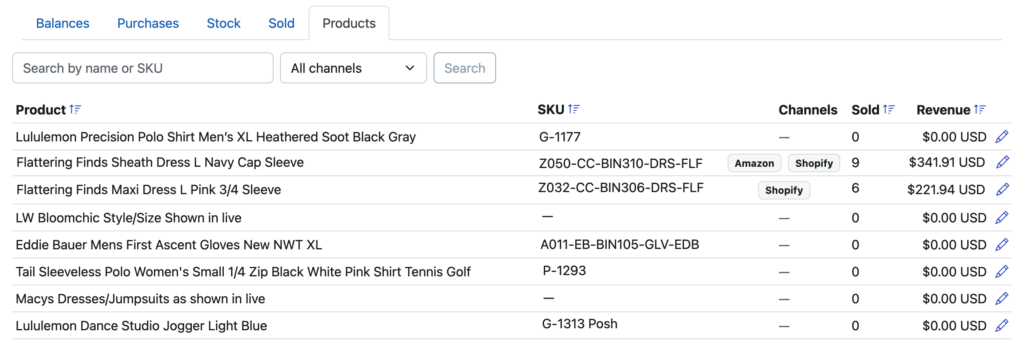
Clicking into the Inventory tab, you will see a new sub-tab called “Products”. For those of you already tracking inventory, it will show to the right of the other tabs.
For those of you writing off cost of goods directly, you’ll also have access to the new Products tab, just without the extra Inventory tabs:
Editing your products
Click into your products tab to a see a list of every product that you have either sold or loaded purchase/cost information for. We show you each product’s name, SKU, how much has been sold and on what channels.
You can sort by product name, by SKU, number sold or revenue.
If you have multiple copies of the same product that use slightly different names, now you can correct that. The same holds for cases where you are missing SKUs or using the same SKU for different items. Correcting those makes it possible to fully automate your cost of goods sold and see your profit per order.
Ready to automate your eCommerce bookkeeping?
Join thousands of sellers who save hours every month with Seller Ledger.
Do you sell cards from top games like Magic: The Gathering, Pokémon, Yu-Gi-Oh!, One Piece and Disney Lorcana? Well, now there’s an easier way to track your sales and determine your profits. Using our updated Chrome browser extension, Seller Ledger will regularly import the key information you need to determine the profitability and taxes owed for your business, including:
Card and pack item prices
Shipping collected
Commissions
Transaction fees
Item fees
Payouts
Plus, if you track your inventory costs with unique SKUs, Seller Ledger will automatically tie those sales back to the item costs, reduce your inventory and update cost of goods sold.
Seller Ledger matches payouts to your bank deposits
Seller Ledger does something pretty powerful when we import your sales, fee and payout history from TCGplayer. We compare all imported transactions from TCGplayer to the payouts we receive and make sure the sum total of all of the transactions in the payout match the amount of each payout.
We even organize your transactions into two sections when you click into your TCGplayer account: “Not paid out” transactions and “Paid out” transactions. In fact, from the TCGplayer account summary view, you can click into any payout to see every single transaction that makes up that payout. This makes sure that your financial amounts from TCGplayer are accurate.
Lastly, if you choose to link your bank account to Seller Ledger, we will also automatically match the payouts that come from TCGplayer to the deposits when they show up in Seller Ledger. These are properly treated as transfers, so you avoid any risk of double counting.
How to automate your TCGplayer accounting
In order to link your TCGplayer account to Seller Ledger, you need only do the following:
1. You should use the Chrome browser when accessing Seller Ledger so that you can also make use of the second tool (below).
2. Once you are using Chrome, you will want to install Seller Ledger’s custom-built Browser Extension. This extension allows Seller Ledger to automatically pull down and import the proper transaction details.
Once you are properly set up, Seller Ledger will regularly access your TCGplayer account and retrieve the order, shipping, commission, fee, and payout information.
Ready to automate your eCommerce bookkeeping?
Join thousands of sellers who save hours every month with Seller Ledger.
In our continued efforts to simply eCommerce accounting, we’re pleased to announce the ability to sync your Square account with Seller Ledger. This provides the biggest step to better automate accounting for Square sellers.
As we did before with our Shopify integration, we allow Square sellers to bring in both online and point-of-sale transactions.
To link your Square account, simply click the “Add Channels, Banks and Accounts” button on your dashboard. Then, click the Square logo:
Log in to Square and, once you are returned to Seller Ledger, we will begin importing you transaction history. Doing so will allow us to bring in sales, returns, fees and even sales tax that you may have collected – all broken out in detail and summarized to help you with tax filing.
And as with any new functionality, we’d love to hear any constructive feedback you might have. Email us at [email protected].
Ready to automate your eCommerce bookkeeping?
Join thousands of sellers who save hours every month with Seller Ledger.
One of the most powerful things about eCommerce is the ability to sell to customers all around the world. Yet one of the most challenging aspects of that is dealing with all the different currencies and the record keeping that comes with that.
Fortunately, Seller Ledger is excited to announce the availability of multi-currency support for eCommerce merchants.
The challenges
To help illustrate the financial complexity, let’s take the example of a North American Amazon seller. When you sell on Amazon to customers in Canada and Mexico, Amazon treats all of those transactions separately from your US-based sales. They issue payouts for those sales (minus expenses) in their native currencies. They also provide their “Activity reports” in those native currencies. This creates a couple of interesting challenges:
1. Reconciling payouts to bank deposits
Even though Amazon issues payouts in their native currencies, when they hit your bank account, you will see them show up in US dollars. But how do you know which deposit goes with the corresponding payout from Amazon? How do you reconcile a payout of $2,316.43 MXN to a deposit of $123.80 USD?
2. Reporting on your business in a single currency?
Even if you can figure out how to match foreign currency payouts to US dollar deposits, how do you look at a single profit and loss statement (or other financial report) that shows an apples-to-apples comparison of sales and expenses?
Automate your eCommerce bookkeeping with Seller Ledger.
How Seller Ledger handles foreign currency transactions
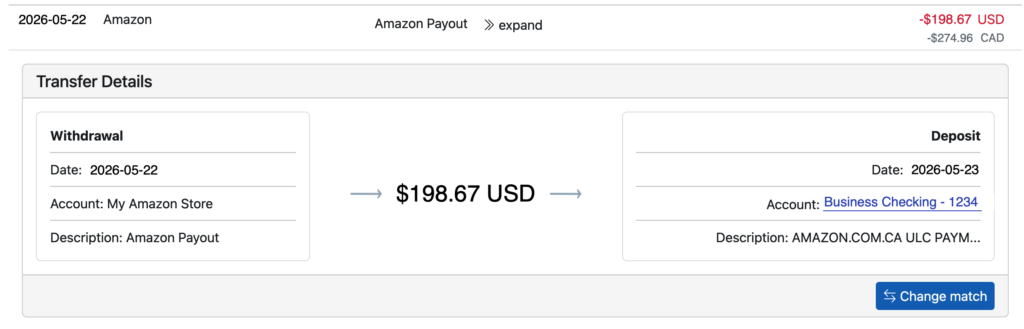
Seller Ledger now uses currency exchange rates to translate foreign currency amounts to US dollars. To see this in action, simply click into your account from the dashboard and scroll down to any non-US transactions, and you’ll see them in both USD and the original native currency underneath:
And when you find a payout, we provide you with even more details. Click “expand” next to a payout that you see in your marketplace account and you’ll see it matched to a deposit in your linked bank account:
What about differences from the exchange rate?
That’s an excellent question and we’re so glad we brought it up. Because exchange rates change all the time, and Amazon doesn’t provide the exact rate used at the time of each transaction, we use the daily “spot rate” to convert amounts from their native currencies to US dollars. And discrepancies end up going under a new category: Foreign Exchange Gain or Loss. This category rolls up to Line 27a: Other expenses on the Schedule C tax form. It will show as a negative number if you lost money overall on the conversion (and as a positive number if you were fortunate enough to benefit from the conversion).
Unlike some other accounting platforms, who may require a higher tier to access multi-currency, raise prices frequently and STILL require you to use a third party connector like A2X in order to handle the reconciliation, Seller Ledger just handles it within the software, at the same price as your normal plan. No forced upgrades. No additional software subscriptions. Just a single, affordable solution. So decide for yourself which accounting software works best for Amazon sellers.
Ready to automate your eCommerce bookkeeping?
Join thousands of sellers who save hours every month with Seller Ledger.
Amazon’s announcement of a new 3.5% fuel surcharge is a whopper of a hit for Amazon sellers’ profits. It sounds expensive as a cost taken out of your top line, but it is even worse when considered in the context of a seller’s net profits.
Prior to the surcharge, there were already a number of different Amazon fee types that could be taken out of a seller’s revenue. Some of these fees are charged as standard monthly fees and others are charged on a per-item basis. That makes it hard to understand the costs associated with any given sale. Given the volumes and complexity, you may need an automated accounting software tool designed for eCommerce to get a true handle on what it’s really costing you to sell.
What does it cost to sell a $100 item on Amazon?
Here’s an illustrative example. Let’s take an Amazon seller with an item that sells for $100.
Inventory Cost
Often the largest cost of selling an item on Amazon is the inventory cost itself, what the seller had to pay in order to acquire the item. Let’s say they purchase it for $50 and are reselling it for $100 on Amazon. This $50 inventory cost is typically referred to as Cost of Goods Sold.
Monthly Amazon Fees
Sellers have to pay $39.99/month as a professional seller or $0.99 per item as an individual seller in order to sell on the platform. Let’s assume our seller is selling 100 items per month on the professional plan, so that monthly fee would work out to $0.39 per item sold.
If they are using Fulfillment by Amazon (FBA) they will also pay monthly storage fees for their inventory to be stored in Amazon’s warehouses. These fees go up if inventory has been stored too long, is oversized, or is dangerous. The fees also go up depending on the time of year when the inventory is being stored, with October-December more expensive to handle the peak holiday volumes. Storage in January-September for standard goods might cost $0.78 per cubic foot of inventory stored, plus an Aged Inventory Surcharge starting at $0.50 per cubic foot for items stored longer than 180 days. If our $100 item takes up one cubic foot and has not been stored longer than 180 days, it would cost $0.78 per month to store.
With these two monthly costs, we’re at a total of $0.39 + $0.78, or $1.17 in total monthly costs for our $100 item. For the sake of simplicity, let’s say the item was only stored for 1 month and this is our total FBA storage cost (though in many cases inventory must be stored longer than this.)
Per-Item Fees
Amazon charges a Referral Fee of anywhere from 8-17% depending on the category in which the item is sold, with a minimum $0.30 fee in most categories. Let’s assume our $100 item is something in the Toys & Games category, which is 15%. Our $100 item would cost $15 in Referral Fees.
FBA Fulfillment Fees are also charged on a per-item basis. These fees range significantly depending on the size and weight of the item as well as other factors. For the sake of simplicity, let’s say we have a “Large Standard” item and we’re paying approximately $5.50 to have Amazon fulfill this shipment for us.
FBA Fulfillment Fees are where the new 3.5% fuel surcharge fee has been added. We’ll hold that cost out for now and show how that impacts Net Profit at the end of this article.
Amazon Advertising Fees
It used to be enough to list your products on a well-established marketplace to drive sales, but in today’s world, it often requires paying advertising fees in order to generate visibility to those listings as well. Advertising on Amazon is sold on a Cost-Per-Click (CPC) basis and costs can range from $0.60 per click in a Low-Competition category to over $5.00 per click in a more competitive space. It’s not uncommon for a seller to pay an additional $15-$30 in Advertising to get a $100 item to sell, though they probably can’t be doing this across all their inventory and remain profitable.
In addition, there are overhead fees to advertising. Agencies to manage your advertising often charge 10-15% of advertising fees. For sponsored brands campaigns, things like high quality photography and ad creative development can be quite expensive.
For simplicity, let’s say advertising costs $5 all in for our $100 item.
Additional Amazon Fees
In addition to the standard fees listed above, there are many additional things Amazon charges for including Inbound Placement Fees, to move your inventory between Amazon Warehouses, Low Inventory Fees, when a high-velocity product becomes low in stock, Returns Processing Fees, Removal Order Fees, when you request your inventory is returned to you, Label Order Fees, when Amazon labels your products for you, and more. For today’s example, we won’t include any of these fees, but they are very real costs of doing business for an Amazon seller.
Net Profit, BEFORE the 3.5% Fuel Surcharge
What is net profit? It’s how much money you’ve made after all of your costs have been taken into account.
In our example of the $100 item sale, we’ve now accounted for the following fees:
$50.00 Inventory / Cost of Goods Sold $0.39 Amazon Professional Sellers Fee $0.78 monthly FBA Storage Fee $15.00 Amazon Referral Fee $5.50 FBA Fulfillment Fee $5.00 Advertising Fees
$76.67 Costs
On our $100 sale, this is a Net Profit of $23.33.
Net Profit, AFTER the 3.5% Fuel Surcharge
If our $100 item has an additional 3.5% Fuel Surcharge, which is calculated on the full cost of the $100 sale, that would be an additional $3.50 in cost.
After the Fuel Surcharge, Net Profit is $19.83. If our seller was making $23.33 before, and now they’re only making $19.83, that is a 15% reduction in Net Profit.
Outsized impact on Net Margin
Your NET PROFIT will drop by 15% in this case
With razor thin margins and massive competition on Amazon already, this is a huge change.
How Can Sellers Understand What this Fee Change Actually Means for their Profits
This was just an illustrative example, and fees on Amazon are very complex. Each seller needs to truly understand their own economics on Amazon in order to know how significant an impact this change will have for them.
The most effective way to truly understand your profits on Amazon is to use an automated accounting software, designed for eCommerce, that will capture the full details of your costs of selling and roll these up to enable you to accurately view your net profit.
Seller Ledger is an automated accounting platform that was designed from the ground up for eCommerce. Sellers can link their Amazon selling account for automated importing and categorization of all Amazon revenues and fees. They can also link their bank accounts and business credit cards to import other costs and sources of revenue. Seller Ledger’s net profit feature allows sellers to see these costs aggregated and understand their net profit. Pricing for Seller Ledger starts at $10/month and there is a 30 day Free trial, no credit card required.
What Can I Do About My Net Profit?
While we can’t solve marginal cost inflation, sourcing cost inflation, tariffs or other increases in your costs, what we can do is offer a lower-cost accounting solution that helps you get full visibility to your numbers at a fraction of the cost of alternatives. We offer a solution that is significantly cheaper than classic accounting software like QuickBooks or Xero, and doesn’t require third-party connectors like A2X or Link My Books to see your eCommerce detail. Give it a try today for FREE, and see if this is a way to claw back some of your net profit.
Ready to automate your eCommerce bookkeeping?
Join thousands of sellers who save hours every month with Seller Ledger.