Best Amazon Accounting Software for 2026

Whether you’re thinking of switching or just getting started, this step-by-step guide will help you choose the right solution for your Amazon business.

Amazon (and eCommerce) accounting comes with a rather unique set of challenges, above and beyond traditional business accounting. In addition to regular income and expense tracking, you can expect to face:

  • Lots of order transactions (if you’re lucky)
  • Even more fee transactions
  • Inventory and cost of goods sold tracking
  • Reconciling platform payouts vs your bank

The good news is, with modern software, you can shrink the time you spend on accounting for your Amazon business from hours a month to minutes.

How do I choose?

First, let’s assume that you’d like to get your Amazon data into your accounting software with as little customization and setup as possible. That will rule out platforms like Wave Accounting and Freshbooks, which not only don’t have direct integrations with Amazon, but they require using a general purpose API (application programming interface) tool like Zapier to make it work. That’s a non-starter for most sellers.

Next, the key question becomes – how much (and what kind of) Amazon data do you want to bring into your accounting software. Specifically, do you want all of the transactions from Amazon or just summarized information?

Detailed vs Summarized Amazon Data

So what does it mean, to get detailed vs summarized Amazon data? Let’s take a look at each method:

Detailed transaction data

This means pulling in every order, including line items, discounts, sales tax collected and remitted, shipping collected and fees subtracted. It also means bringing in shipping label transactions, and LOTS of other Amazon fees.

What are the pros and cons of this approach?

Pros:

  • You get a perfect understanding of your Amazon accounting, not only at the P&L and balance sheet level, but also down to the net profit on every sale (if your solution can pull that off – more on this later.)
  • You can automate inventory and cost of goods calculations by mapping sales back to the original inventory purchases.
  • You avoid the issue of payouts that can span different periods (e.g. an early January payout that includes both December and January transactions.)

Cons:

  • A lot of folks (especially old-school CPAs) worry about “cluttering up” your books with too much detail, which can bog down your accounting platform’s performance. Amazon does produce an enormous number of small transactions.
  • Reconciling all of those transactions to the payouts and deposits to your bank can be a royal pain in the neck if your solution doesn’t do this for you (again, more on this later.)

Summarized data

Using this approach, instead of bringing in all Amazon transactions, you summarize them outside of your accounting platform, and instead, match the totals to each payout that shows up in your bank account.

The pros and cons of this approach are pretty much the reverse of the above:

Pros:

  • Reconciliation of all of those Amazon transaction totals to your payouts should be easier.
  • You avoid “cluttering up” your accounting software with details you may never need to dig into.
  • The performance of your accounting software remains high by limiting the data you add.

Cons:

  • You miss out of net profit calculations.
  • You can’t automate inventory/cost of goods calculations.
  • Payouts that span multiple months or years are still problematic.

Biased perspective

We’d like to take a quick moment to point out the following observations. We believe two of the most commonly referenced reasons for choosing the “summarized” approach stems from folks dealing with practical limitations of existing solutions.

First, the idea that a lot of data will “clutter up” accounting software is more a reflection of the design of that software than the data itself. Good software design, especially around the user interface, can do an awful lot to hide details until you’re ready to look for them. In addition, when a software solution already has a lot of non-eCommerce features that already “clutter up” the interface, perhaps avoiding those unused features would help.

Second, the argument about performance is equally fascinating. There are many other platforms that process exponentially more data than accounting platforms and yet are still performant. Just ask Google, Amazon, eBay and Shopify (or TaxJar.) So changing your desired behavior because of the scaling limitations of a platform seems suboptimal.

What are the best options?

In addition to looking at the data options from Amazon, you may have some other criteria specific to you and your business. How much do you want to do yourself vs outsource to an accountant or bookkeeper? Do you want something specifically designed for eCommerce? How much do you value simplicity? Are you price conscious?

We’ll go through the leading contenders in the space, based on current (2026) sentiment:

Seller Ledger

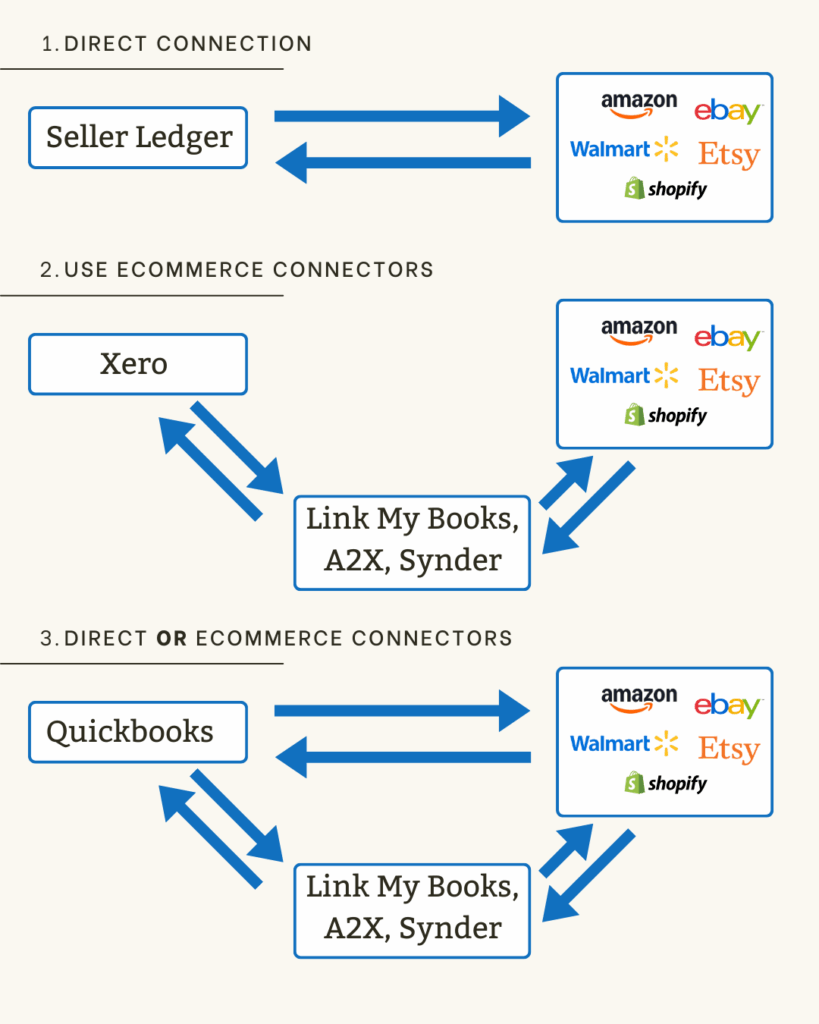
Seller Ledger is one of the newer players in the space, created by several of the original team members behind Outright/GoDaddy Bookkeeping and TaxJar. It provides both the accounting platform plus a direct Amazon integration (as well as many others) and chooses the “detailed transactions” approach.

Seller Ledger is specifically designed for eCommerce sellers, so it has a much simpler user interface and setup process that traditional accounting software. It also has a pricing model that starts much lower and grows with the size of your businesses. Additionally, it does not limit features based on pricing tiers.

Detailed transaction approach

Seller Ledger pulls in all transaction data from Amazon via a custom-built integration. It does not require any third party connectors. And while it does pull in every Amazon transaction, it also ties every single transaction to each payout, and matches those payouts directly to your bank account deposit. This addresses the concerns about payout reconciliation, because it is built into the system, and also avoids the timing issue when a payout occurs around the end of a period.

It groups all transactions related to each Amazon order (including fees, shipping labels, etc) so you can see your net profit per order. That includes cost of goods sold, if you are using unique SKUs. Plus, it can automate inventory levels using the FIFO (first-in, first-out) method.

If you want to outsource your Amazon accounting completely, you can use Seller Ledger and invite your accounting pro to access your data. But bookkeeping services are not included in the price of the software.

Plans start as low as $10/mo for very small sellers and go up based on monthly transaction volume.

Limitations/concerns

As of the time of this writing, Seller Ledger is primarily designed for US eCommerce sellers. It handles US income and sales tax very well, but does not yet provide currency conversion. All non-US transactions are shown and summarized in their native currencies.

It is also exclusively designed for eCommerce businesses, so if you require invoicing other features for service-based businesses, you may want to look elsewhere.

Quickbooks Online or Xero + third party connector

The most familiar names in accounting software, these two classic platforms support all kinds of business types, not just Amazon businesses.

Quickbooks is by far the most popular accounting platform in the market. It has a direct integration option with Amazon, though most commentary suggests using a third party connector (A2X, Link My Books, Synder) to properly handle Amazon data. It is also more recommended for US-based businesses. However, Quickbooks is also relatively expensive and is notorious for raising prices (as in, up 35% in the last 3 years as of this writing.)

Xero has no direct integration with Amazon, relying instead on those same third party connectors. It tends to be much more recommended for non-US businesses (especially anyone based in New Zealand or Australia.) And it is quite a bit less expensive than Quickbooks.

Now let’s look at the third party connectors. While there are a lot of more general purpose middleware solutions out there (e.g. Zapier, Webgility, etc,) we are going to focus on the 3 that appear to be the best tailored for eCommerce.

A2X Accounting is well respected for their data accuracy and working especially well with Quickbooks. They use the “summarized” approach to bringing in Amazon data, though they have a creative solution for splitting payouts across periods. They are said to be a bit more complex than other solutions, and more expensive.

Link My Books, which also uses the “summarized” data approach, focuses a bit more on ease of use and VAT compliance. It is also a bit less expensive that A2X Accounting.

Synder is a more broad-based connector, working not only with Amazon and other marketplaces, but also with payment platforms like Stripe, PayPal and Square. They also support the “detailed” approach to Amazon data in your accounting platform. They tend to me a bit more complex, which, given their extra capabilities makes sense. And their pricing is a bit higher.

The combos

Given the performance and “clutter” concerns, and seeing the US vs non-US focuses, it would seem like the choices really come down to:

  • Quickbooks + A2X Accounting (if you are US-based)
  • Xero + Link My Books (for non-US businesses.)

In both cases, you will be using the “summarized” Amazon data approach, with the pros and cons mentioned earlier.

Both combinations are also designed very well to worth with accounting professionals.

In terms of pricing, Quickbooks Online + A2X Accounting is going to be on the more expensive side, at likely $100-$200/mo to start (depending on how many channels you link and transactions you process.)

Xero + Link My Books appears to start at about half that rate and go up from there.

One additional thought: by using two different applications, it might make for fun customer support inquiries if/when something changes or breaks. And given how often Amazon adds or changes their fees, software updates are inevitable.

Finaloop

Another relatively new option, Finaloop is a “full service” solution for eCommerce businesses looking for software + bookkeeping all in one place. Like Seller Ledger, they provide the accounting platform and a direct integration with Amazon, using the “detailed” data approach. And similar to Synder, they also link to other marketplaces and payment platforms. But their big claim to fame is that their service also comes with team members who will do your bookkeeping for you.

With pricing that starts at $250/mo, the base pricing isn’t that much more expensive than Quickbooks + A2X Accounting. But, prices rise pretty quickly and are based on your business revenue.

Limitations/concerns

Given what happened to Bench Accounting, another startup that tried to build a “software + bookkeeping” business (more broadly than eCommerce,) you’ll want to make sure you can take your data with you if needed.

Summary Comparison

Seller Ledger

Best for:

  • Small to mid-sized Amazon sellers in the US
  • Those who want detailed Amazon data
  • Those who want an affordable option

Quickbooks + A2X Accounting

Best for:

  • Scaling US-based Amazon sellers
  • Those who want summary level data
  • Those willing to pay for quality/reputation
  • Already have an accounting pro that likes this combination

Xero + Link My Books

Best for:

  • Scaling non-US based Amazon sellers
  • Those who want summary data
  • Those looking for a more affordable summary solution
  • Already have an accounting pro that likes this combination

Finaloop

Best for:

  • Amazon sellers who want to outsource their bookkeeping but don’t already have an accounting pro
  • Those willing to pay for that outsourcing
  • Those who want detailed Amazon data

View your Amazon profit per order

Just as we announced earlier last summer with regards to eBay, we are proud to announce the ability to see the NET profit on each Amazon order. What is net profit per order? It’s how much money you make after all order-level costs have been factored in, including inventory cost, fees and shipping. Many customers think of it as their “ROI” or return on investment for each item they sell.

Amazon profit per order

If you click the “>>expand” link next to any order in your Amazon account, you will now see all expenses that are tied to that order. This includes any and all Amazon and FBA fees associated with that order. In addition, if you purchase shipping labels through Amazon, we include that too.

And most importantly, as we talked about when rolling out our Gross Profit report, if you track your inventory costs at the item level and use unique SKUs for each of your Amazon items, we will match those costs to the correct item.

There are a lot of solutions out there that will summarize Amazon amounts and match them to payouts, but how many other accounting solutions tie everything together like this to see profit on every single order?

Feel like trying this out for yourselves? We offer a 30-day free trial with no credit card required.

Reconcile Amazon payouts to bank deposits

If you are trying to tackle eCommerce accounting, you know how critical it is to be able to reconcile marketplace sales and expenses to the payouts that hit your bank account. Well, just like we previously did for eBay, we are pleased to announce the ability to drill into any Amazon payout to see the precise data that makes up that payout amount.

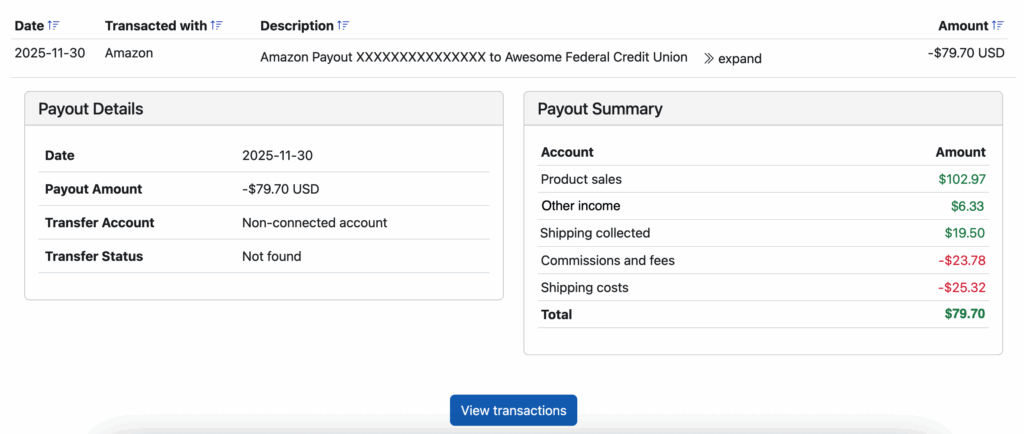
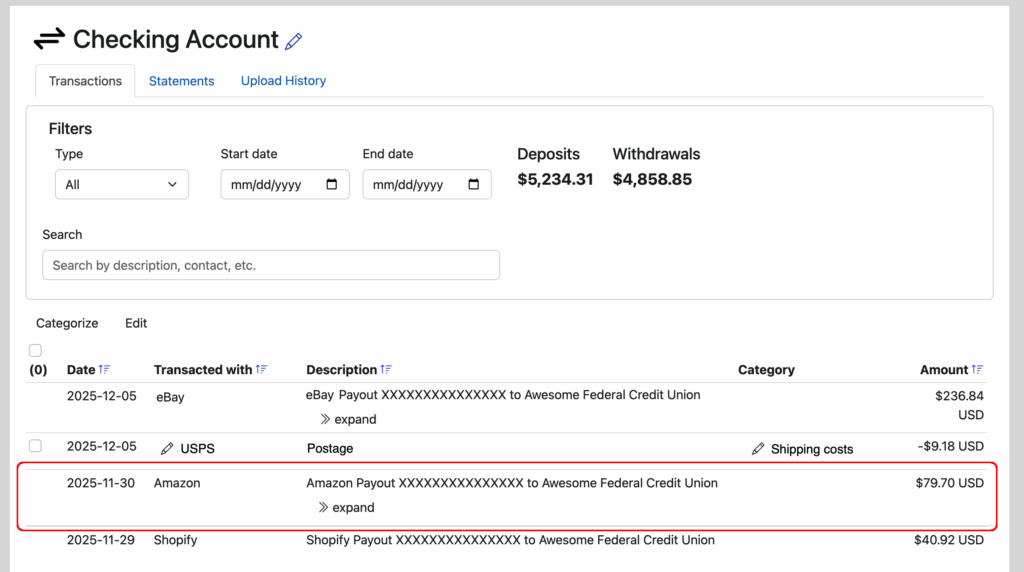
When you click into your Amazon account from your Seller Ledger dashboard and review your transactions, you have likely seen your payouts listed with an “>>expand” link next to them:

When you click expand, you’ll see some important additional information. Not only do we show the bank account details that the transfer was made to, but we show the summary totals by category.

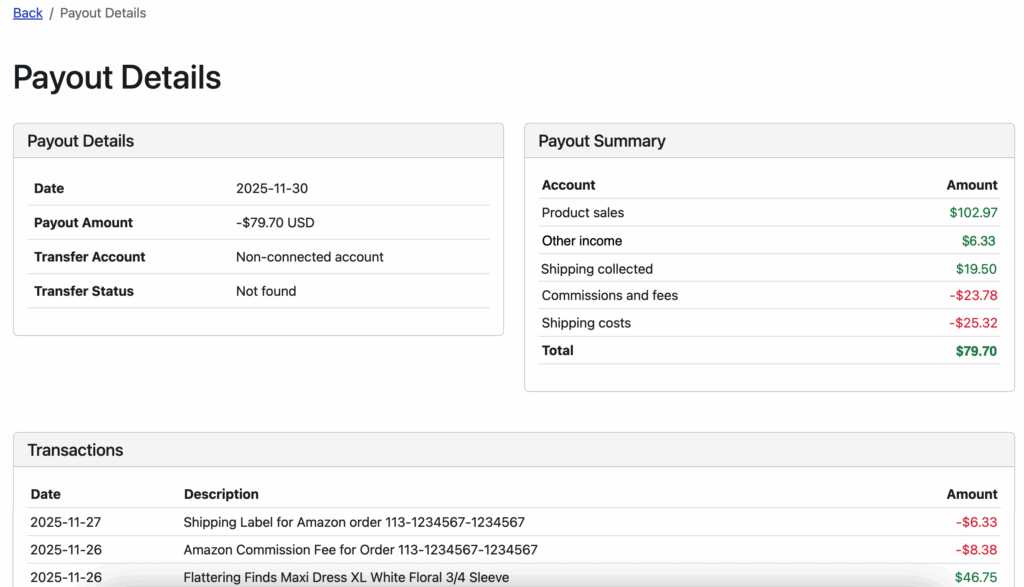
And if that’s not enough, we also provide a button to be able to drill down and see EXACTLY which transactions make up that payout.

And as a reminder, if you link Seller Ledger to the bank account where those payouts get deposited, we will automatically match the payouts from your Amazon account to the deposit in that bank account.

This means you can look at any Amazon payout deposit and drill all the way back down to see the transactions that are included.

If you haven’t yet tried to automate your Amazon accounting with Seller Ledger, now might be a good time to try. No 3rd party connectors needed.

New Amazon Channel summary page

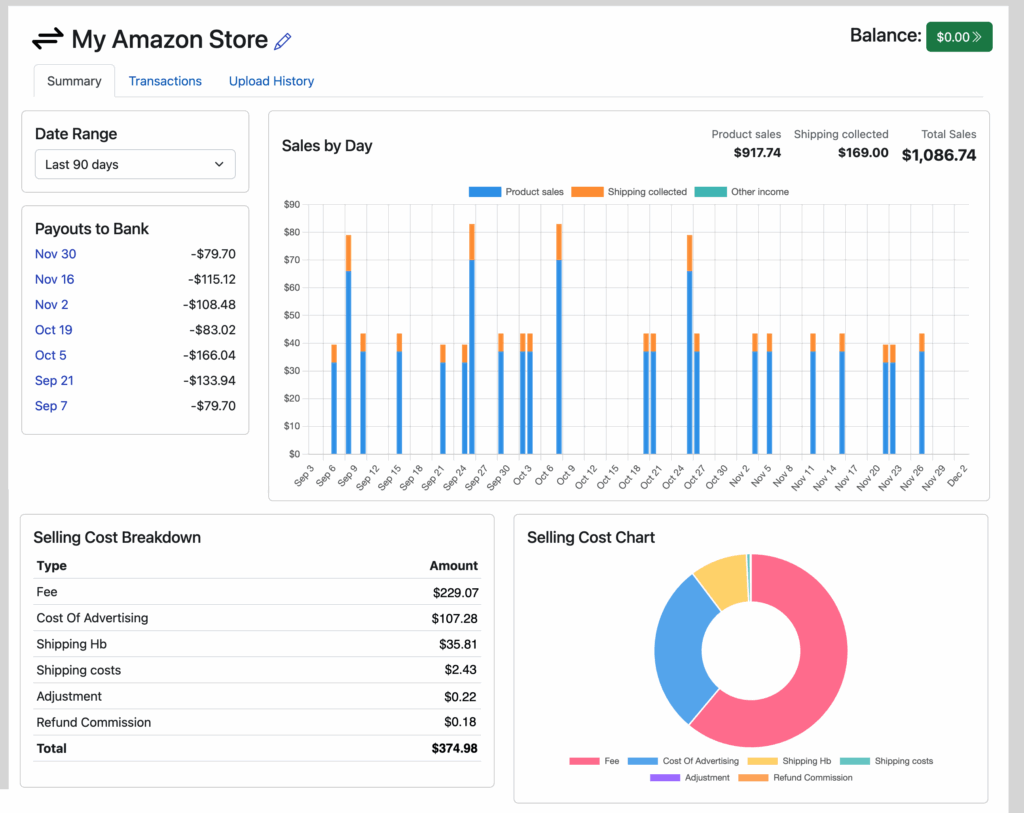
As we did earlier this summary for eBay, we’ve now rolled out a new channel summary page for Amazon as well. While Seller Ledger has been able to import all of your Amazon sales, refunds and fees for a while, now it’s even easier to make sense of all of that detailed data.

Now, when you click into your Amazon account from your Seller Ledger dashboard, you’ll see a screen like the following:

amazon channel summary

Drill down on any payout to see the totals for each payout including every single transaction that’s included in that payout.

Amazon has a large number of transaction types, especially their fees. While Seller Ledger focuses primarily on rolling up all of those amount to your end of year tax form, this new view should help you get a better sense of all of Amazon financial data.

Want help automating your Amazon accounting? Learn more about how Seller Ledger can help.

Balance sheet and journal entries

While it is important for Seller Ledger to remain simple to use, we have just rolled out some more powerful accounting features that were previously under the hood. Please note, they are all in open Beta, so please send us any feedback you have at [email protected].

Balance sheet accounts

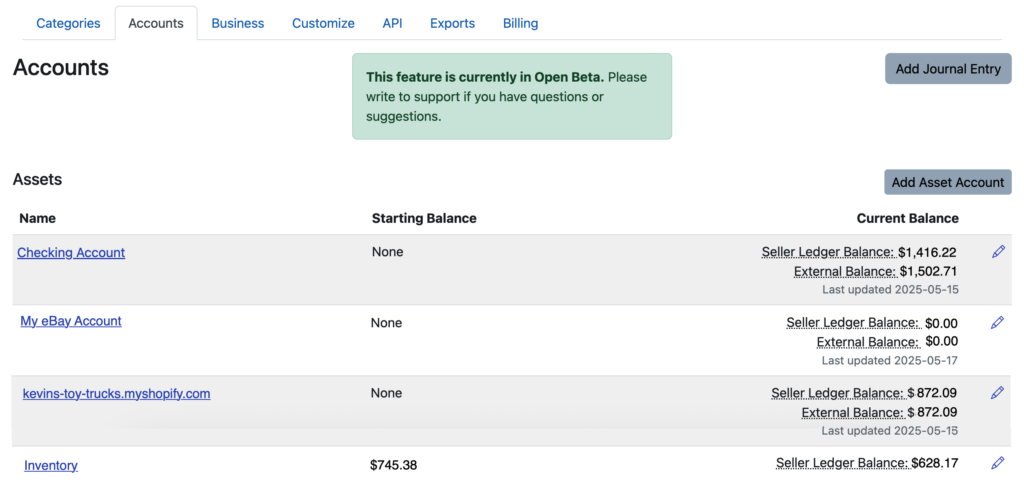
From the beginning, Seller Ledger let you categorize your income and expenses, including the ability to add sub-categories. Now, we have provided the same functionality for balance sheet account, which you can find under Settings, in the new “Accounts” Tab,

Balance sheet accounts

As you will see, any connected accounts that you have will already show up there, as well as internal accounts we created behind the scenes, like Sales Tax Due and Owners Equity.

There are a number of possible accounts you might want to add, but here are some of the more common ones we have heard:

  1. Cash accounts for tracking cash you withdraw and spend
  2. Sales channel accounts that we do not yet support directly
  3. Equipment tracking accounts, for depreciable assets like computers
  4. Liability accounts for tracking outstanding loans

Balance sheet report

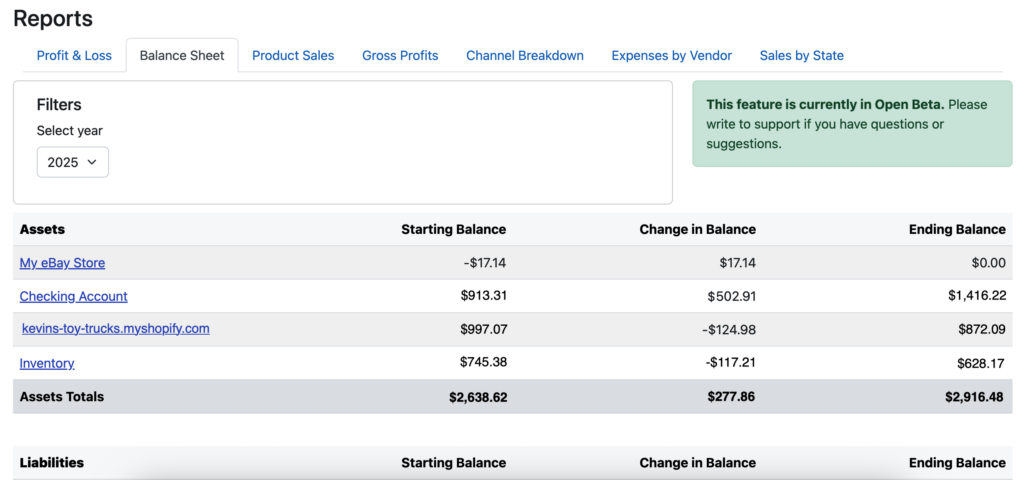
In addition to exposing and letting you customize your balance sheet, we’ve also just rolled out a new Balance Sheet report, which you can find in a new sub-tab under the Reports tab.

Journal entries

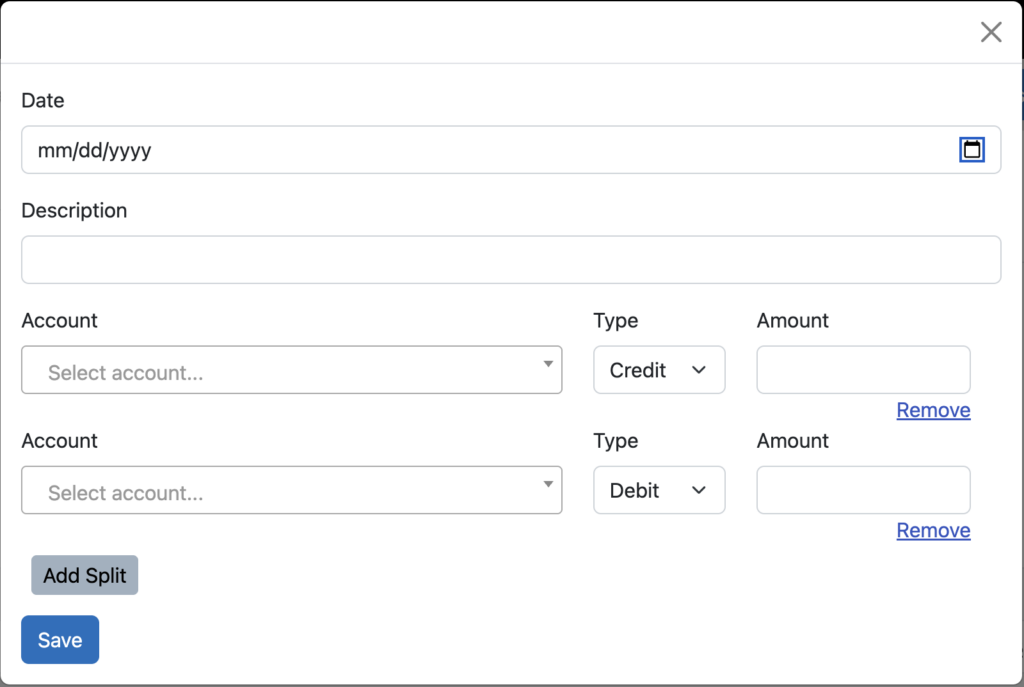
And finally, the ultimate accounting utility, the journal entry, has been introduced. This feature lets you create any accounting transaction across multiple accounts/categories.

It is also the first place you will see the use of the dreaded accounting terms “debit” and “credit.” But, we assume those who intend to use this feature are familiar enough with accounting to understand these terms.

Now, remember, with great power comes great responsibility. Journal entries allow you to change your account balances in many different ways. But it is also easy to mess up your books. If you are not familiar with the use of journal entries, we recommend learning more before using this feature too much.

One caveat: we do not yet let you make journal entries that affect directly connected sales channels, as we try to keep the raw data from those channels as accurate as possible.

eBay fees too high? It depends.

One of the most common complaints we see among small eCommerce sellers is that eBay fees are too high. As are fees at Amazon, Etsy, Poshmark and other eCommerce marketplaces. This becomes especially common whenever new fee increases are announced.

While price increases often produce an emotional response (we are only human, after all – at least until AI starts writing these blog posts,) we thought it might be helpful to provide some context on marketplace fees and how you can evaluate them rationally (and analytically.)

What do marketplace fees get you?

To start, it might help to remember some of what you get from your online marketplace seller fees. For the sake of this article, we’ll use the example of selling on eBay versus selling on your own website.

1. A full-stack eCommerce platform on which to sell

What do I mean by “full stack”? Well, I mean everything that you would need to sign up for, configure and pay for yourself to start selling online through your own web storefront. For example, if you want to set up your own eCommerce storefront, you’d need to arrange (and pay for) the following:

  • A domain name. It’s the equivalent of a street address on the internet.
  • A hosting account which can handle the internet requests to visit and purchase from your online storefront. Oh, and you will likely want it to be secure, so you’ll want an SSL (secure socket layer) certificate.
  • Software to run your storefront. Your options here run anywhere from coding it yourself to using existing platforms like Woo Commerce or Shopify, which run from free to sizable monthly subscriptions.
  • A payment service, like Stripe or PayPal, to let you accept payments from your customers.

Online marketplaces provide all of the above for you. In additional to thinking about the cost savings with each item above, it might also help to think about the time savings of all the things you don’t have to spend figuring out, setting up, and, especially, fixing when they break. There is a very high probability that the large marketplaces have more reliable systems than what you might cobble together.

2. Marketing

This is the big one, and it’s not even close. The #1 thing you get from listing items for sale on a marketplace is traffic. Finding customers is one of the hardest things to do in business, let alone in an eCommerce business. Online marketplaces have done the heavy lifting to build large brands with huge numbers of customers who visit them every day. You benefit from that, though you do need to compete for attention among all other sellers on a marketplace.

To better understand why we focus on “marketing” so much, just imagine what you would try to do if you launched your own website. Let’s say you have a brand new eCommerce website, it’s live, it’s beautiful, it works perfectly and has amazing, unique, incredibly valuable items for sale at extremely reasonable prices.

How do you get people to visit your store?

If you google “how to drive traffic to your ecommerce website”, you will find a TON of content offering all kinds of advice (as well as some “experts” willing to help you, for a fee.) And you can compare that to what Shopify and Wix suggest. But let’s discuss a few of the common techniques you’ll likely find.

Word of mouth

Likely the very first thing to try is to reach out to your entire network of friends, family and professional colleagues. Ask them for help, ask them for advice, and of course, ask them to tell everyone they know about your amazing new web storefront.

Search engine optimization

In the brick and mortar world, you can choose a location with good foot traffic, though the rents will likely be higher. On the internet, there really isn’t a lot of foot traffic. The closest equivalent is search traffic, so you’ll want to make sure your website is optimized for key search terms. Of course, you’ll need to do this better than your competitors in order to get a high enough ranking. And some of those competitors are the very same online marketplaces, who’ve spent years developing expertise and credibility so that they can drive traffic to their customers’ listings.

Paid advertising

In the brick and mortar world, we used to be able to advertise in the Yellow Pages, but that’s been replaced by the online world. You can advertise on search engines like Google, as well as social media sites like Facebook and Instagram. You could sponsor podcasts from influencers who talk about products like the ones you sell. There are a lot of options out there that can help you reach your target customer, but it’s critical that you test and measure your ad campaigns on each of them, to be able to know whether you are making enough money to justify the continued investment.

eMail marketing

Even though it’s been around for a long time, email continues to be a very effective tool for communicating with customers. But in order for this to work, you need to get people to give your their email address, which requires a whole other step of finding prospective customers and giving them enough of a reason to give you their email address. This leads us to the next concept.

Content marketing

One of the most common techniques you’ll see to help drive traffic to your website is a more indirect method that is sometimes called “content” marketing. This means creating a bunch of content (or paying someone else to do it,) that is related to what you’re selling, but different enough that it can attract people who are not explicitly seeking out a specific item. Writing blog posts, sending newsletters, creating videos or reels on YouTube, Instagram and Tiktok, these are all examples of content marketing.

Social media

Perhaps the fastest growing technique for acquiring customers is to build up a presence on social media channels like Instagram, TikTok, Facebook, SnapChat, etc. Social media platforms make it much easier for you to build lightweight relationships with “followers” and “connections.” But you still have the challenge of creating interesting enough content to gain those followers. That said, because this is a much newer domain and is rapidly evolving, there may be more opportunity to do something new and unique.

Other ideas

There is no shortage of marketing ideas that you can try for your website. For example, you could create an affiliate program to get influencers to promote your store. Or roll out a customer loyalty program to get your happiest customers to spread the word. When you’re an entrepreneur, everything is worth a try:)

How do I compare the costs of marketplaces vs doing it myself?

While there is no “easy” answer to this, as everyone’s business is different, we have tried to pull together some resources to help you get a better sense of where your costs should fall. So if you are thinking that eBay’s fees are too high, compare that to some of the statistics below.

The CMO Survey from 2021 states that “B2C Product companies spent 18.4% of their revenue on marketing in 2021.”

This blog post from Boldist suggests “The Small Business Association recommends 7-8% of revenue should be spent on marketing, but what we see, in reality, is that ecommerce companies will spend up to 30% of their revenue on Customer Acquisition Costs.”

And if you have time to dig through a LOT of great detail, check out Marketing Sherpa’s 2015 eCommerce Benchmark Study. Notice that most respondents talked about how their customer acquisition costs are expected to go up over time.

Final Thoughts

Every small business owner needs to decide for himself/herself how best to spend their money. But we are big fans of making informed, data driven decisions to help grow your business. Hopefully this article helps provide some context for evaluating the true cost of online marketplace fees and whether your money would be better spent elsewhere.

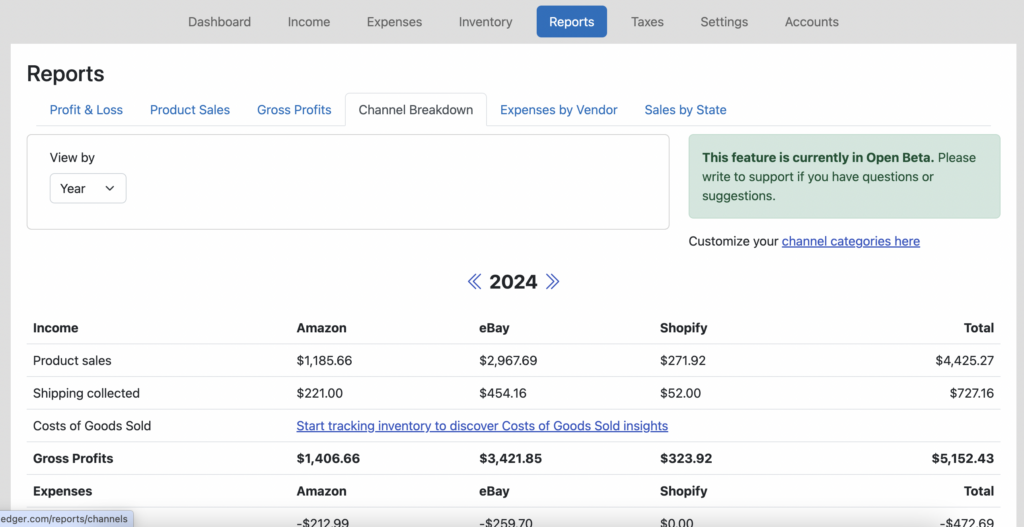
Want an easy way to see your fees per online sales channel? Remember to check out our recently added Channel Breakdown report.

Not yet a Seller Ledger user? We offer a 30-day free trial, co credit card required.

Automate your Amazon accounting with Seller Ledger

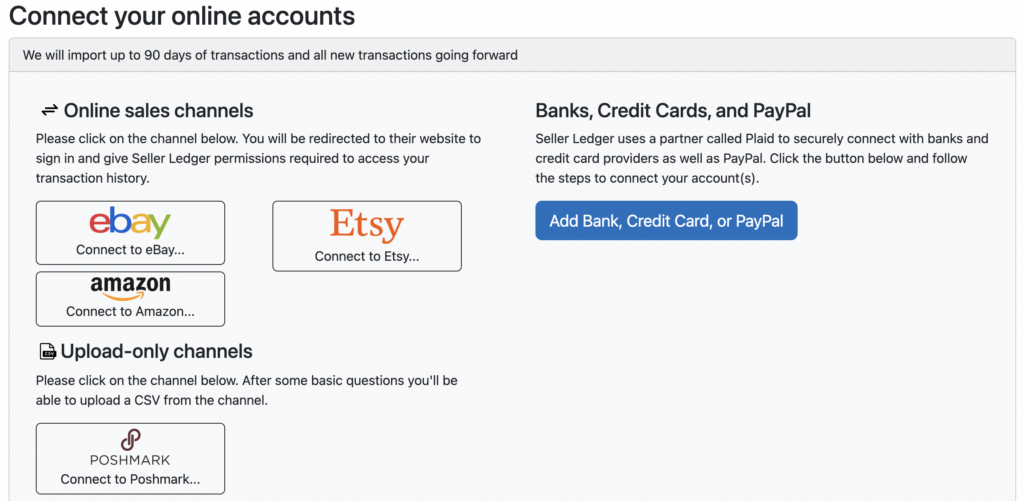
We are proud to announce that Seller Ledger now connects directly with your Amazon Seller Central account to help automate much of your Amazon business accounting. As with eBay and Etsy, you can link your Amazon Seller Central account to Seller Ledger and we’ll regularly import your sales and expenses and automatically categorize them for you. Just log into your dashboard and click the “Add Account” button to link your Amazon account.

Also, like with eBay and Etsy, you can always change how you’d like to see your Amazon information categorized by customizing your settings.

Thanks again to the customers who helped us in testing this new integration. Amazon did limit the number of people we could link during the beta period, so we may yet see some new transaction types. If this happens, you may see your Amazon import pause, and we’ll be notified on the back-end to add support for the new transaction type.

Amazon has also listed us in their Selling Partner Appstore, where customers are able to learn more about the product and leave reviews. We’re big fans of customer word of mouth, so if you have an opinion about Seller Ledger and would be willing to share it with other prospective customers, please do.

Next up:

We’re actively working on a Mercari import solution (similar to what we recently announced with Poshmark) and the ability to upload CSV files for poorly or unsupported banks. If you would be interested in beta testing either of these features, please email us at [email protected].

Until next time…

The Seller Ledger team