
New Amazon Channel Summary Page

As we did earlier this summer for eBay, we’ve now rolled out a new channel summary page for Amazon as well. While Seller Ledger has been able to import all of your Amazon sales, refunds and fees for a while, now it’s even easier to make sense of all of that detailed data.
Now, when you click into your Amazon account from your Seller Ledger dashboard, you’ll see a screen like the following:
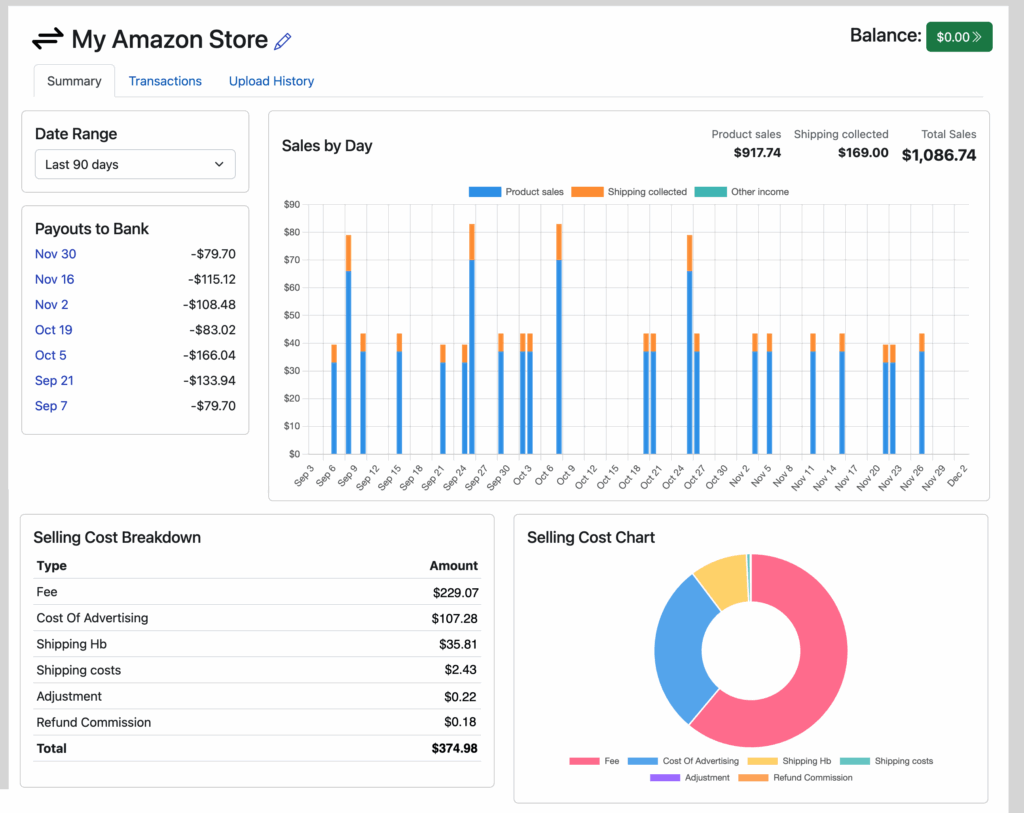
Drill down on any payout to see the totals for each payout including every single transaction that’s included in that payout.
Amazon has a large number of transaction types, especially their fees. While Seller Ledger focuses primarily on rolling up all of those amounts to your end-of-year tax form, this new view should help you get a better sense of all of Amazon’s financial data.
Want help automating your Amazon accounting? Learn more about how Seller Ledger can help.
Ready to automate your eCommerce bookkeeping?
Join thousands of sellers who save hours every month with Seller Ledger.
No credit card required