
Flexible Inventory Tracking: From Basic Counts to Item-Level Detail

Let’s face it – inventory tracking is the hardest, most laborious part of eCommerce accounting and bookkeeping. Many small sellers choose to skip it altogether, using the cash-based method of writing off every inventory item as cost of goods sold as soon as they make the purchases. Others try tracking the cost of every item purchased all the way through to sale. And yet, most of those sellers still have trouble keeping up with the tracking required to do so.
Well, now there’s a more flexible inventory tracking option: periodic inventory.

What is Periodic Inventory tracking?
Periodic inventory tracking is the most flexible inventory tracking option available to merchants because, instead of tracking every single inventory transaction, you can simply take “periodic” counts of your unsold inventory, update your inventory balance, and calculate cost of goods sold based on a simple formula that matches IRS tax forms:
Cost of Goods Sold = Beginning balance + Purchases - Ending balanceFor a deep dive into period inventory tracking, feel free to check out our support article.
A simple example
Let’s say, on your last year’s tax return, you filed an ending inventory balance of $5,000. Let’s also say that, for this entire current tax year, you buy another $10,000 in inventory. Rather than trying to track every item coming in an out, you simply wait until the end of the year and count up all of your unsold inventory. And let’s say you discover that all of your unsold inventory cost $2,500. That means that the cost of all of the items you sold this year was $12,500
$12,500 (cost of goods sold) = $5,000 (beginning balance) + $10,000 (purchases) - $2,500 (ending balance)It makes sense, right? If you have less inventory at the end of the year than you did at the beginning of the year, you must have sold more than you purchased.
Counting up your inventory once per year is a lot less work that trying to track the ins and outs of every item purchase and sale. But it also gives you much better insight into your business performance than just writing off all of your purchases using the cash-based method.
Let’s take the example above. Let’s say you sold $25,000 worth of goods for the year. Under the cash-based inventory method, you would have claimed $10,000 in cost of goods sold. Using that number to calculate your gross profit and margin for the year, you would think you made $15,000 in gross profit, or 60% ($15k profit divided by $25k in sales).
But the periodic method shows your cost of goods sold as $12,500. In that scenario, you would know that you actually made a gross profit of $12,500, or 50% ($12.5k profit divided by $25k in sales).
And using the cash-based inventory method also means that there will be other years where you were less profitable than you realized.
For the cost of counting up your inventory at least one time per year, you get a much more accurate view into your business.
Cash vs Periodic: They are closer than you think
If you want to see just how close cash and period inventory are, just check out this blog post. Hint – the only difference is whether you track an inventory balance at all.
How it works in Seller Ledger
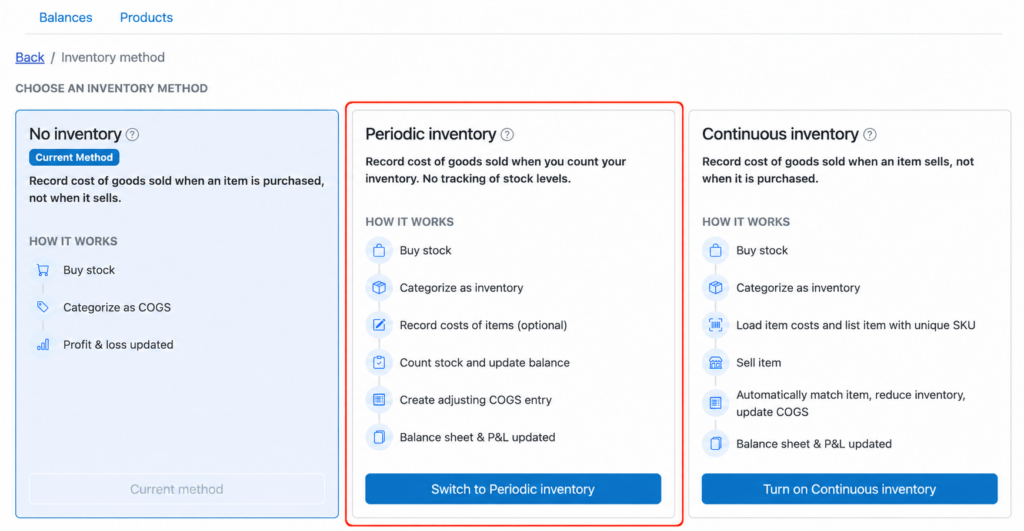
If you are interested in trying periodic inventory tracking in Seller Ledger, it’s quite simple to turn on. Click on the Inventory tab and, in the upper right, click the “Change” button next to your current inventory tracking method.

This brings up a screen where you can now explicitly choose periodic as an option.
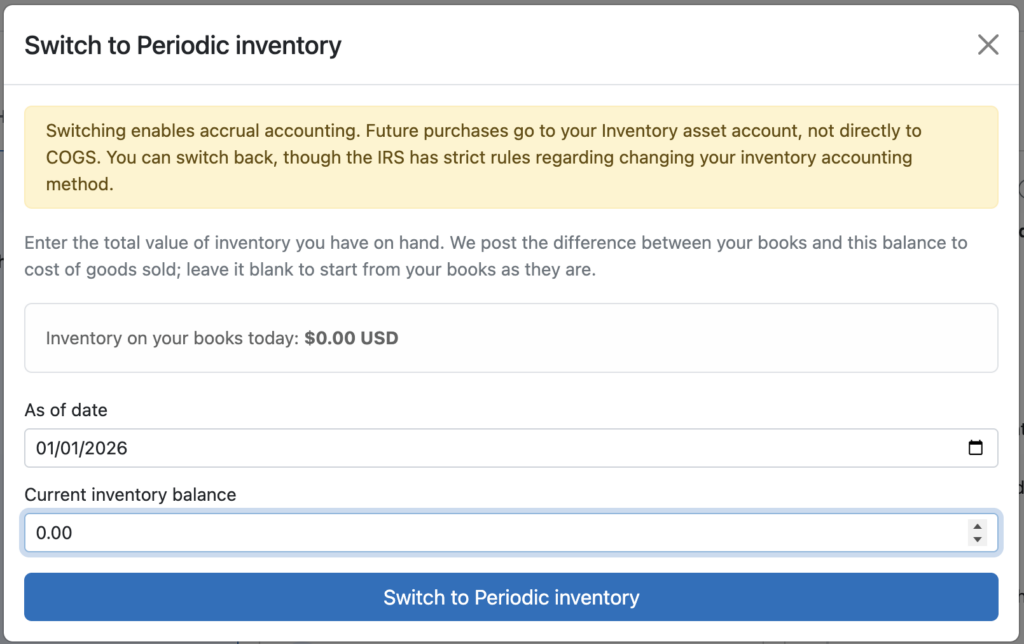
Click the button to switch to periodic and then enter the starting date and balance.
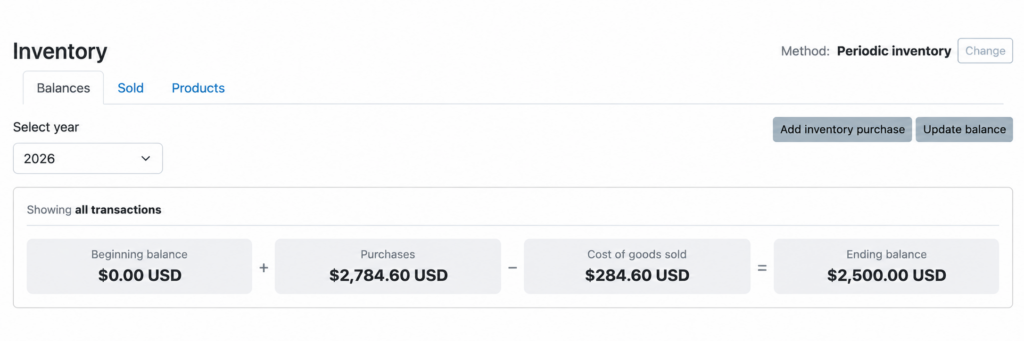
You’ll now see a very similar inventory balances page showing you the totals.

Because you’ve switched to periodic, you are no longer writing off all of your purchases as cost of goods sold, so that amount is no longer showing there. Instead, you need to count up your inventory in order to calculate the cost of goods sold.
One of the great things about periodic inventory is that you don’t HAVE to wait until the end of the year to count up your inventory. You can do it at any time. Let’s say you go and count up your unsold inventory right now, and discover you have $2,500 worth. Here’s where the magic happens. Just click the “Update balance” button in the upper right to bring up the following screen. Type in the amount that you just counted and Seller Ledger does the math for you to determine what your cost of goods sold needs to be.

Click Save and watch your inventory formula update automatically. Your balance has been updated, as has your cost of goods sold so far for the year.
What if I want to track the cost of some individual items?
As it turns out, periodic inventory actually lets you track anywhere from no item level details, all the way up to complete item level detail.
See that “Sold” sub-tab? Click on there to see your recent item sales. Let’s say you know you paid $40 for the most recent sale listed. Click the “Add costs” button next to it.

Now enter your $40 cost.
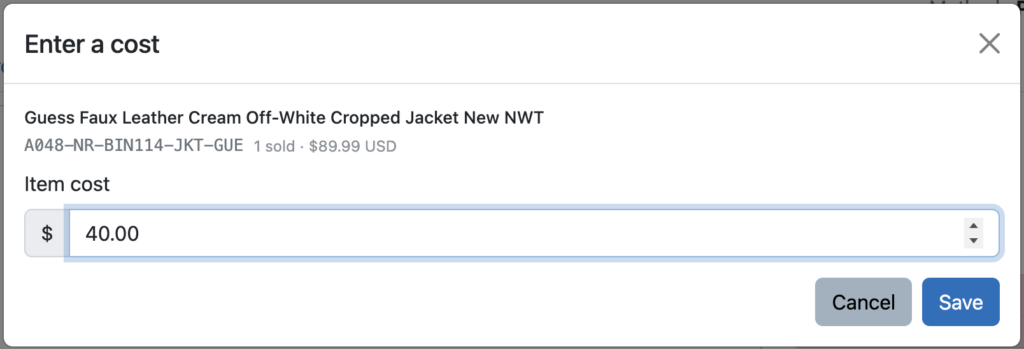
Click Save and we’ll now show you the gross profit on just that item sale.

But here’s the cool part. Click back on the Balances tab. Because the sale you entered the cost for occurred before the balance update you just provided, the cost of goods sold total remains unchanged. However, click on that number and you’ll see something very interesting.

Seller Ledger keeps track of costs that you entered directly, as well as the amount that was calculated based on a balance update. Going forward, you can choose to track the costs of some item sales and we’ll update your cost of goods sold as you go. Then, when you get to the end of the year, you can do a final inventory count, update your balance, and we’ll figure out the cost of items you didn’t bother to record individually.
Wrapping up
If you are ready to take your inventory tracking to something beyond cash-based, but are not quite ready to sign up for perfect detail tracking, this option is for you. It’s even a great option for folks who want to track most of their item details, but just have trouble staying 100% current.
As we do with all new features, we do want to say that there might be some near-term bugs/issues, but email us and we’ll fix them as quickly as we hear about them.
Happy tracking!
Ready to automate your eCommerce bookkeeping?
Join thousands of sellers who save hours every month with Seller Ledger.
No credit card required