
How to Track and Clear Dead Stock with an Inventory Aging Report

Whether it’s slow-moving items you’ve already listed, or inventory sitting in your death pile, unsold inventory drains your business of important cash and takes up unnecessary space. Fortunately, Seller Ledger has released a new Inventory Age report to help you clear out dead stock.
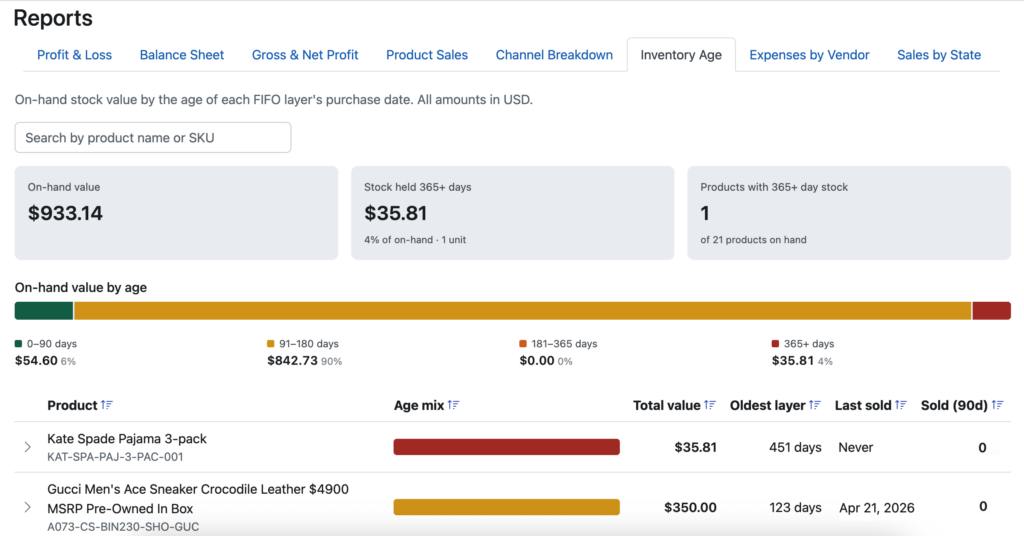
You can see your inventory broken into batches based on how long it’s sat unsold. If you purchased multiple batches of the same item at different times, you can see the breakdown by hovering over the Age Mix graphic, or by expanding the row.
We also show you how long it’s been since your last sale and the number of sales over the last 90 days. You can even sort by column to find those inventory items that could use some clearing out.
Important note
The Inventory Age report is only available if you are using continuous inventory tracking. Cash and periodic inventory don’t require tracking the purchase date of each item. As such, we can’t provide this type of report for those methods.
Ready to automate your eCommerce bookkeeping?
Join thousands of sellers who save hours every month with Seller Ledger.
No credit card required