For eCommerce merchants who want to track their inventory stock levels and per-item gross profit, we’ve now made it easier for higher volume sellers to load their inventory information into Seller Ledger.
Update
Since this article was originally published, we’ve released a much more flexible approach to CSV file formats. You can learn more about that here.
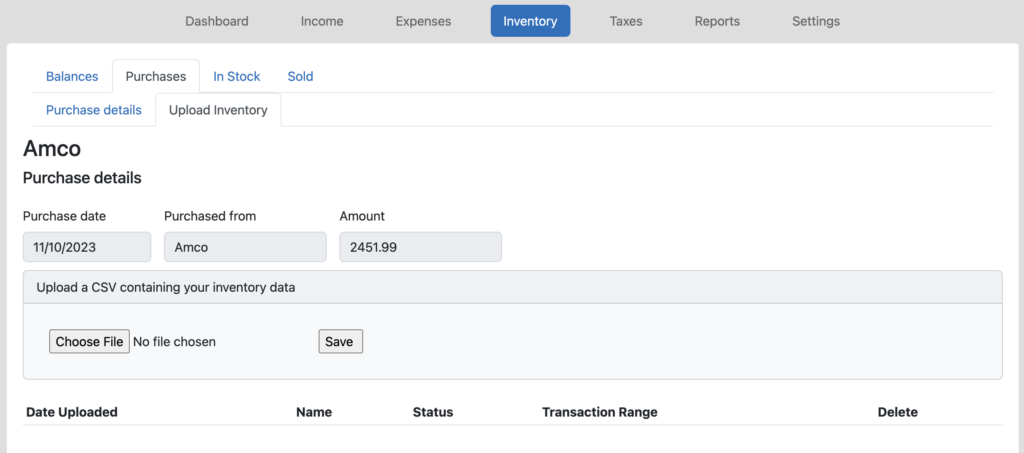
If you make large purchases from certain vendors, and don’t want to type all of those items into Seller Ledger, there’s now an easy way to upload your items (and cost information) via a CSV file. Simply generate a comma-separated file that contains columns with headings of “sku“, “product name“, “quantity” and “total cost” and upload it inside of any of your inventory purchase transactions.
Not only can this help you save time when entering purchase information, but it comes in particularly handy if you want to start the year off fresh, or import inventory from another platform.
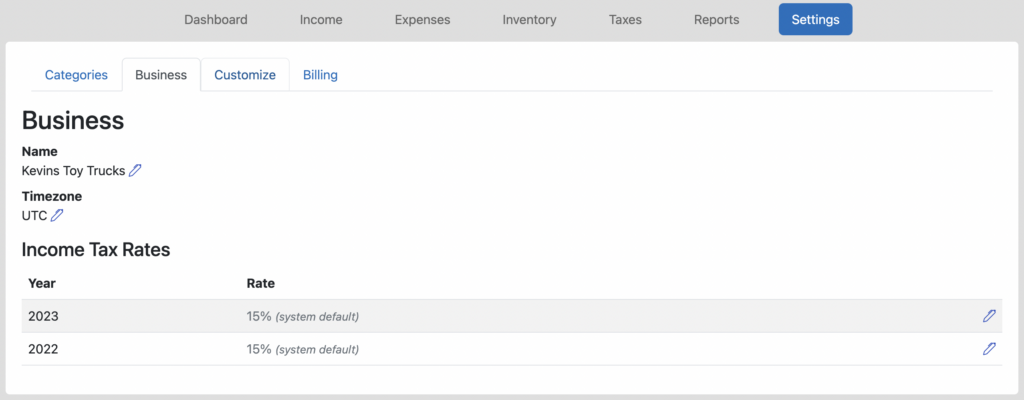
To help eCommerce sellers better match the 1099-Ks that get filed by online payment providers, Seller Ledger today announced support for local US based time zones.
Why is this important?
When Seller Ledger imports your transaction history from different online sales channels and banks, we receive them with timestamps (which, if you’re curious, might look something like “Tue, 26 Dec 2023 15:14:01.753000000 UTC +00:00”). You may notice the “UTC” in there – that stands for Universal Time Coordinated (it used to be called Greenwich Mean Time) and it’s 5 hours ahead of EST (or 4 hours ahead during daylight saving time).
However, online marketplaces, when providing transaction totals and reports, tend to use the customer’s local time zone to calculate those totals. So, to help make sure you can match the numbers that online marketplaces are reporting (and be consistent with the IRS from year to year), we have now added the same time zone support.
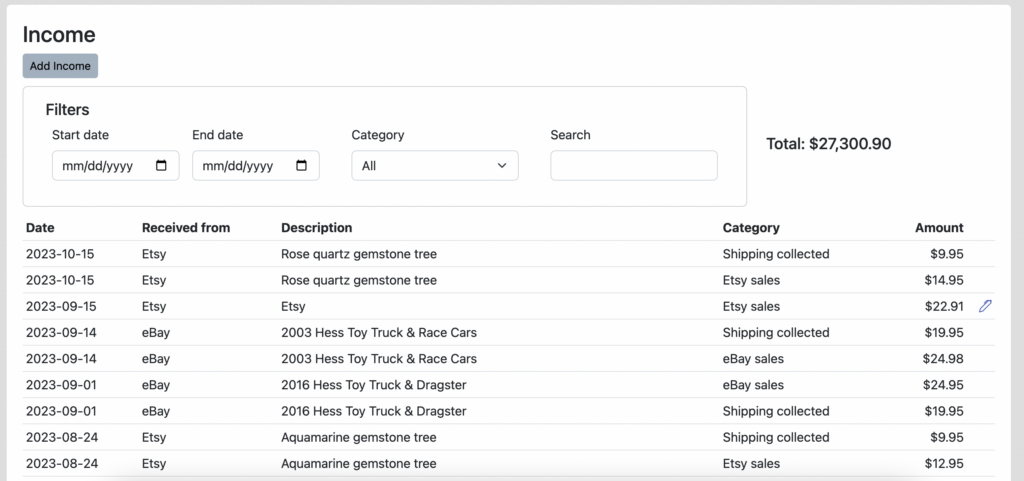
Seller Ledger now allows you to search among your income and expense transactions. In addition to filtering transactions by date range or category, you can also now search using specific words that show up in your transaction descriptions.
For example, let’s take a look at a full list of “Income” transactions below:
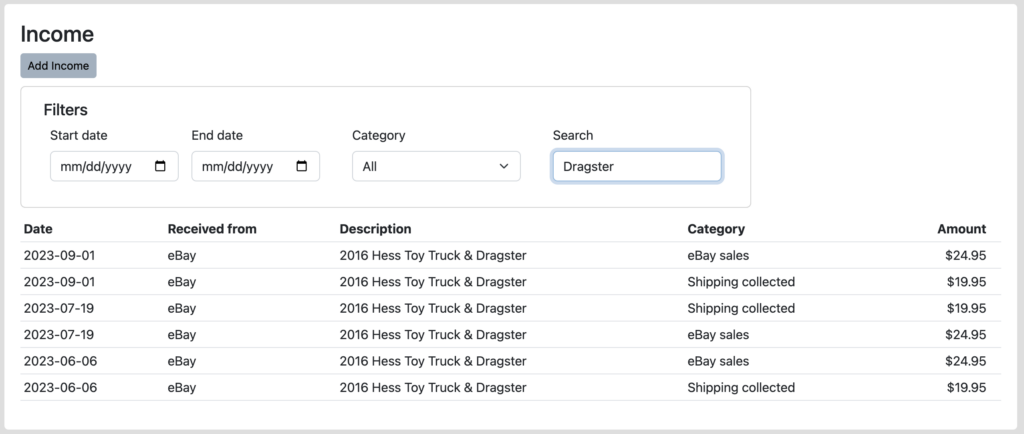
Now let’s say I wanted to see just the sales of Hess Trucks with the “Dragster” included. Simply type “Dragster” into the “Search” box, hit return and you see all of the sales of those truck types.
We know folks have also requested similar search capability within Inventory, and that is on the list. In the meantime, please let us know what you think of this functionality, especially any ways that we can make it better by emailing us at [email protected].
Ready to automate your eCommerce bookkeeping?
Join thousands of sellers who save hours every month with Seller Ledger.
To help reduce data entry for poorly supported banks and credit cards, Seller Ledger has now added the ability to import transaction history via CSV formatted files.
Update
Since this article was originally published, we’ve released a much more flexible approach to CSV file formats. You can learn more about that here.
This will come in handy in a couple of scenarios:
Poorly supported banks
While we do have great coverage of most banks and credit cards through our banking partner, Plaid, we have learned of a few cases where a certain bank or account type isn’t well supported (often from small regional credit unions). In these cases, if your bank or credit card account is not well supported via direct integration, you can add a new account that supports CSV-formatted files.
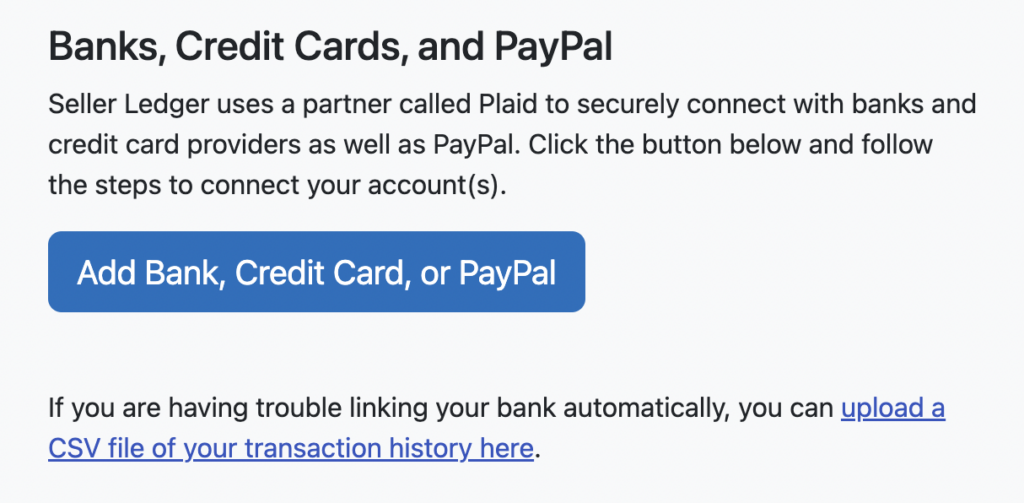
Just click “Add an account” from your dashboard, and on the right-hand side of your screen, you will see a new link under the Add Bank… button.
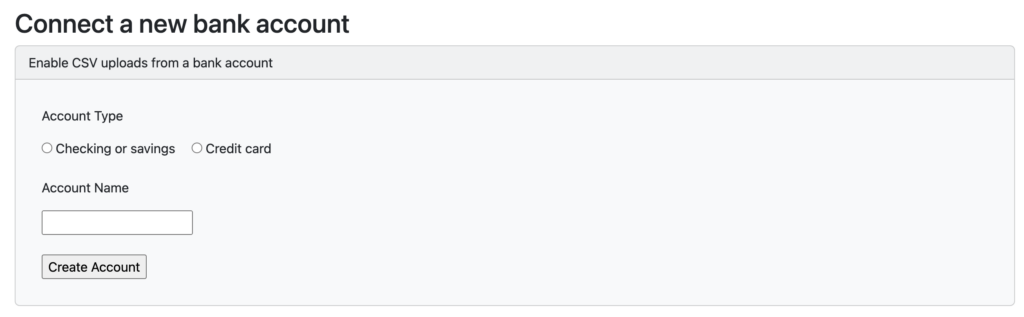
Clicking that link brings you to a new screen where you can choose the type and name of your bank or credit card account:
Choose the type of account, give it a name and click “Create Account.” Doing so will add a new account to your dashboard and allow you to upload a CSV file of your transaction history, much like you can do for Poshmark and Mercari.
Then go to your bank or credit card’s website and download transaction history using the CSV (aka “comma-separated”) format.
Also note: for any customers still in their trial period, Seller Ledger still applies the same 90-day history window, and will ignore transactions outside that range.
Banks with limited transaction history
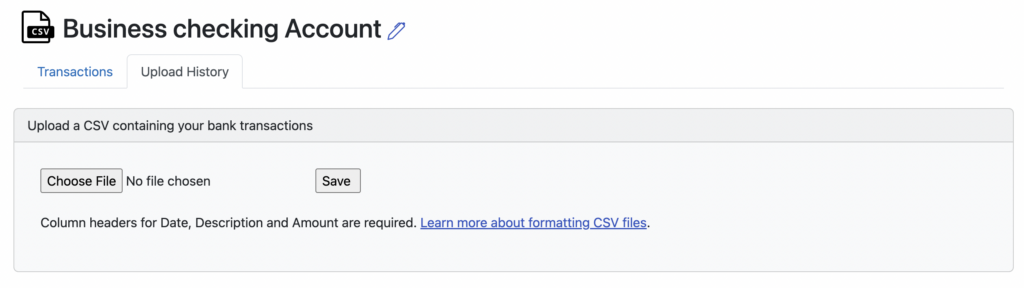
As a policy, we ask customers to commit to an annual plan in order to go back and get more than 90 days of transaction history. While we have a good track record with online sales channels and many banks, some banks simply do not provide more than 60 or 90 days. Fortunately, this new CSV file support allows you to go back and upload older transaction history. Just click into your connected bank or credit card account, choose the Upload History tab (as seen above) and upload the CSV file you downloaded from your bank.
We continue to make this new CSV feature more flexible, so if you come across an issue, please let us know at [email protected] and we’ll work to improve it.
Ready to automate your eCommerce bookkeeping?
Join thousands of sellers who save hours every month with Seller Ledger.
We recently received a question about whether sales tax and shipping are part of cost of goods sold. Because this is a very common scenario, we decided that this would make an interesting blog topic.
There are actually a couple of key questions here:
When you buy items for resale, what gets included in Cost of Goods?
If you buy multiple different items in a single transaction, how do you allocate any sales tax, shipping or other extra costs across those items?
What is included in Cost of Goods?
When you purchase items for resale, all of the direct costs you incur should be included in Cost of Goods. This can include the following:
Sales tax
Shipping costs (to deliver the items to you)
Extra fees (e.g. extra charges for paying by credit card)
Handling fees
So, if you buy an item for $100 and get charged $7.75 in sales tax, your Cost of Goods for that item should be $107.75.
How do I handle extra costs for purchases of multiple items?
The same rules apply in terms of including sales tax, shipping and other fees. However, when these extra costs apply to multiple different products, you need to allocate them based on the relative values.
Let’s take a look at an example. Imagine you have a receipt that looks something like this:
You spent $309.60 to acquire 600 items (500 of Widget 1 and 100 of Widget 2). But the items themselves only cost $250. So what do you do with the other $59.60? Here, a little math is involved. Take the amount spent on the first item (Widget 1: $200) and divide it by the total spent on all items ($250). Widget 1 represents 80% of your item costs. As such, Widget 1 should have 80% of the sales tax and shipping costs allocated to it. So, multiply the $59.60 in extra costs by 80%, and you’ll get $47.68 in extra costs that should apply to Widget 1. The remaining $11.92 in extra costs should be allocated to Widget 2.
The net result of these allocations gives you total Cost of Goods of:
Widget 1: $247.68 (for 500 items) or a per-item cost of $0.50
Widget 2: $61.92 (for 100 items) or a per-item cost of $0.62
You may notice there’s a potential rounding issue here, which we’ll address in a future blog post. Stay tuned.
In Seller Ledger, once you categorize the purchase of $309.60 as “Inventory”, you might see a screen like this:
Just click “Add Details” and enter your newly allocated cost information like this:
Please note: this is only possible if you’re choosing to use item-level tracking in Seller Ledger. You can learn more about it by reading our support article.
Allocating costs from underlying receipts
Since publishing this post, we have added the ability to load inventory costs from receipts, complete with the ability to extract and alloate other costs.
In summary – yes, sales tax, shipping and other fees should be included in Cost of Goods Sold. Hopefully this makes the subject a bit easier to understand.
As always, we’d love to hear any feedback you might have on the product, as well as any other critical questions you have about eCommerce accounting, bookkeeping, inventory and Cost of Goods Sold. Please reach out to us at [email protected].
Ready to automate your eCommerce bookkeeping?
Join thousands of sellers who save hours every month with Seller Ledger.
eCommerce sellers, large and small, now have the ability to track inventory with Seller Ledger. Until now, customers could only write off inventory as “cost of goods sold” when purchased. But no longer!
Why track inventory in Seller Ledger?
There are a number of reasons to track inventory:
For most eCommerce sellers, the IRS requires that you do so.
It better aligns costs with your sale.
If done properly at the item level, it can help automate accurate stock levels (avoid stock-outs) as well as tell you how much money you make on individual orders and items.
So what does Seller Ledger offer in terms of eCommerce inventory tracking?
There are now 2 main ways to track inventory in Seller Ledger: periodic and continuous.
Option 1: Periodic inventory tracking
For those sellers who don’t want to track every item of inventory, the IRS uses a simple formula to help you calculate “cost of goods sold”:
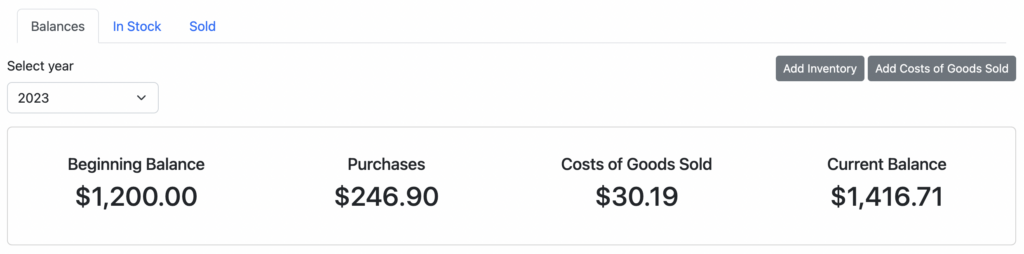
Cost of Goods Sold = Beginning balance + Purchases – Ending balance
We’ve modeled our new inventory view after this simple formula:
Using this approach is pretty straightforward – you only have to do a few things:
Count/estimate the cost of all of your unsold inventory once per year (or quarter, or month – you choose)
Track purchased goods/materials for resale throughout the year
Do some simple math (or let Seller Ledger do it for you)
Do you already keep a spreadsheet of all of your inventory, including how much you paid for each item? When an item sells, do you have to go back and update it? Have you tried to figure out how much money you make on each sale? If you can answer “yes” to any of these questions, then this option is for you.
While a bit more effort is required, the steps are quite simple:
When you purchase goods for resale, categorize them as Inventory purchases
Within each purchase, enter each item, including a unique SKU value, and the item’s cost. This process works very similarly to splitting transactions.
Alternatively, you can start from your list of sold items (the order history we’ve already imported for you) and just tell us which purchase transaction included the item sold.
If you provide Seller Ledger with this level of detail, we do a few things for you automatically when an item sells (matching first based on SKU first, then by name):
We reduce the stock level for that item in your inventory
We calculate and generate the cost of goods for that item
You do not. If you would prefer to just categorize inventory purchases as “cost of goods sold,” you are free to do so. But, you might want to make sure you understand the risks with that approach. We’ll be writing another post about that option soon.
How do I try this out?
Automate your eCommerce bookkeeping with Seller Ledger.
For existing customers, just log into Seller Ledger, and you will see two new changes to the website. First, on the left of your Dashboard, we have added and made visible a new “Inventory” asset account. Second, there is a new top-level navigation link for Inventory. For those who previously categorized inventory purchases as “cost of goods sold,” you can elect to switch to properly tracking inventory. We explain more about how that works here.
Is there an additional charge for tracking inventory in Seller Ledger?
No – this feature is available to all customers at no additional charge. Unlike other accounting/bookkeeping platforms, we think even the smallest sellers should be able to see how much money they make on each item and keep on top of their inventory stock levels.
Please tell us what you think
This is a pretty big release, and represents weeks of work and planning. It’s also something we never got to tackle with Outright/GoDaddy Bookkeeping. As such, we’d love to hear from you as you try this new functionality – the good, the bad and the ugly.
Ready to automate your eCommerce bookkeeping?
Join thousands of sellers who save hours every month with Seller Ledger.
Another one of the most frequently requested enhancements has arrived: the ability to split transactions into multiple categories.
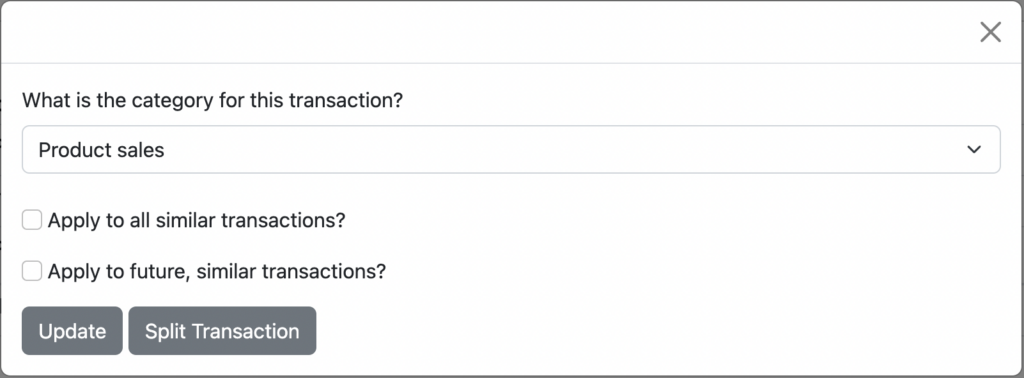
Do you have charges on your credit card for multiple items that belong in different categories? Do you have deposits in your bank account from marketplace payouts that represent net amounts, after combining sales, shipping and subtracting fees? Well, you no longer need to choose a single category for each of those. Now, when you click the button to “Categorize” a transaction, you will see a new option to “Split” that transaction:
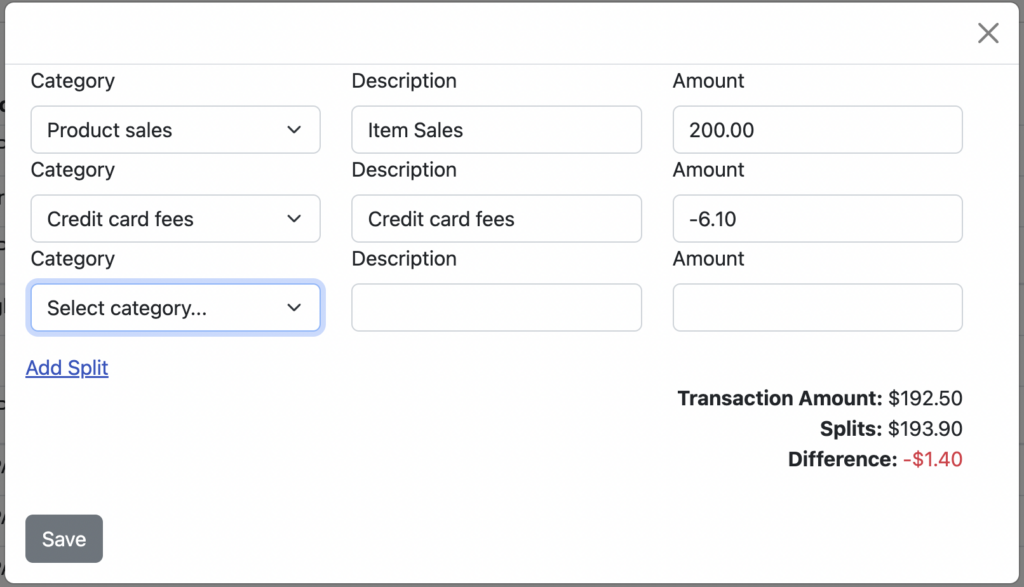
Now, click on the “Split Transaction” to break that transaction into multiple categories:
Notice that as you enter an amount in each row, the remaining difference is updated, to let you know how much of the original transaction you still need to account for. As you can see, you also have the ability to “Add Splits” to provide more detail.
For those of you selling on platforms like Poshmark, Mercari and others, who don’t provide APIs, this feature should help you get your numbers more accurate (in order to better match any 1099-K’s you may received.) Though feel free to contact those platforms and tell them to “get with the times”.
As always, please let us know what you think of this change by emailing us at [email protected].
Ready to automate your eCommerce bookkeeping?
Join thousands of sellers who save hours every month with Seller Ledger.
One of the biggest remaining tasks that we’ve been working on simplifying is the ability to categorize all of your “uncategorized” transactions as quickly as possible. Well, today we took a big step forward by announcing three changes:
First, we’ve added some logic to shorten the descriptions we receive from banks and credit cards to shorter, more recognizable merchant and customer names.
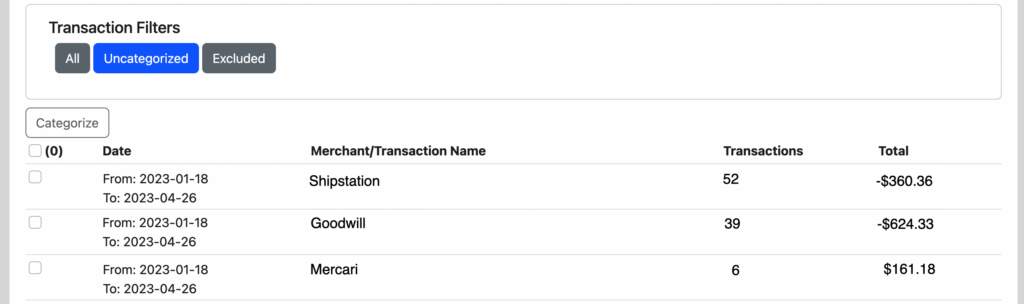
Second, when you click on a dashboard button for “uncategorized” transactions (or if you click the “Uncategorized” filter button in your account view), you will now be presented with a page that shows all of your uncategorized transactions grouped by merchant name or description, sorted by transaction count. This allows you to knock off the biggest grouping of uncategorized transactions as quickly as possible.
Categorize many transactions at once
Third, we have added the ability to select multiple merchant names/descriptions so you can categorize multiple groups of transactions at once. Do you see multiple vendors where you buy items for resale? Select them all, click “Categorize”, choose “Cost of Goods Sold” and boom!
Please let us know what you think of this change by emailing us at [email protected] or commenting on this post.
Update: April 2024
In the time since we launched this feature, we’ve updated some elements of the user interface. See below for a more current description.
When you click in from the dashboard, you’ll still see “uncategorized” transactions grouped by merchant/transaction name. But you may notice that we have some additional filters in the account views. You can always reproduce this option by clicking the “Type” filter and choosing “uncategorized.”
Ready to automate your eCommerce bookkeeping?
Join thousands of sellers who save hours every month with Seller Ledger.
Seller Ledger now supports a direct integration with Etsy to bring in your product sales, expenses and fee information.
How to link Etsy
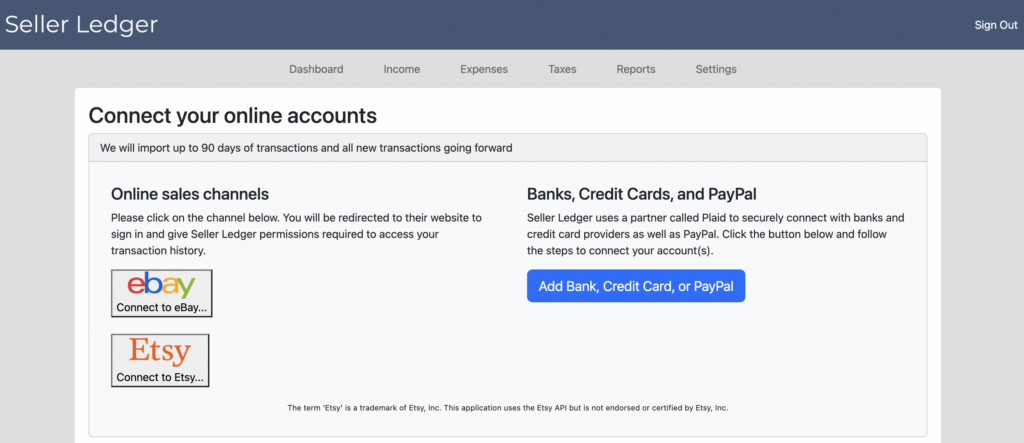
From your Dashboard, below your current connected account(s), simply click the “Add Connected Account” button and you will see an updated screen with a new option:
Connect your Etsy store to Seller Ledger
Click on the button with the Etsy logo and follow the steps to give Seller Ledger permission to import your information. If you have more than one Etsy store, just repeat the process for each store.
By default, Seller Ledger will import 90 days’ worth of transaction history when you connect Etsy. We will then categorize them as follows:
Etsy value
Seller Ledger Category
Order value
Product Sales
Shipping
Shipping Collected
Discount amount
Discounts
Refund amount
Refunds
Shipping Label
Office expense
Etsy fees
Commissions & Fees
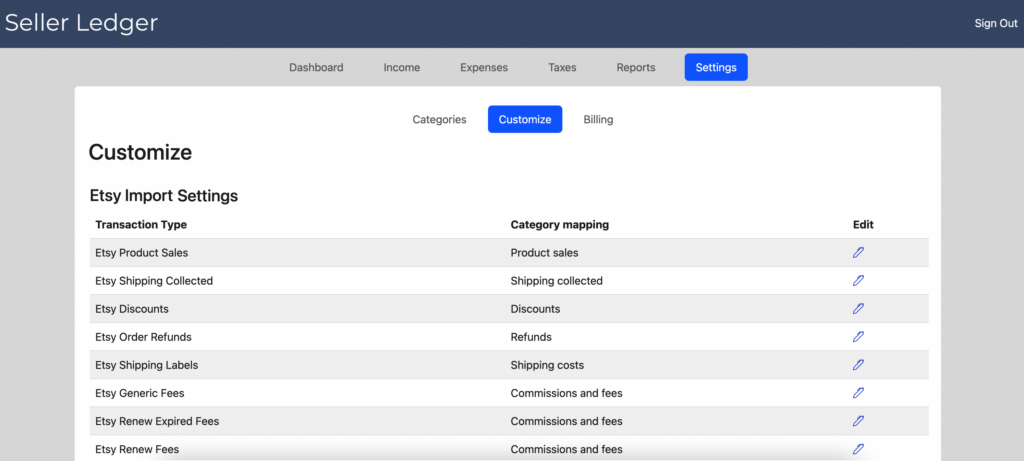
If you’d prefer, Seller Ledger also allows you to customize how you’d like to see your Etsy information categorized. Just go to the Settings tab and click the Customize button:
We posted earlier about ways you might want to consider using this feature.
We’re always looking for constructive feedback, so please let us know what we can do to make Etsy bookkeeping easier and better. Email us at [email protected]
Ready to automate your eCommerce bookkeeping?
Join thousands of sellers who save hours every month with Seller Ledger.
Launch day! Seller Ledger has officially exited its “Beta” period and now offers automated bookkeeping software that’s specifically designed for online sellers.
First, a “thank you” to our Beta customers
There is no way we could have pulled this off without the help of more than 300 online sellers who took the time to bang on our software to find the bugs, the data discrepancies, and the things that just weren’t easy enough to use. Your commitment to helping, your patience with the flaws, and your continuous communication made this possible.
What does it mean to “launch?”
No, we’re not throwing some big event (though we can’t rule that out for future milestones. Launching simply means we are at the point where we’re asking folks to pay to continue using Seller Ledger. It also means we’re committing to supporting the product going forward. We still have big plans for improving the product. In addition to adding new marketplaces like Etsy, Amazon and others, we will also continue to prioritize smaller improvements to make the product easier to use.
Do I have to pay now?
While we’d certainly appreciate it, we are giving all of our Beta customers the same 30-day trial period they would receive if they just signed up today. But they have the benefit of keeping all of the data already in their account (including transactions for the full 2022 year where available.)
If you’re new to Seller Ledger, you can sign up for a free 30-day trial, import up to 90 days’ worth of sales and expense history from eBay, PayPal, banks and credit cards, and see for yourself how well the product eases your bookkeeping burden. We don’t ask for a credit card or any form of payment up-front. At the end of your trial, decide for yourself whether we’re providing enough value to pay for continued use. If the answer is no, that’s ok. We’ll just do our best to earn your business in the future.
Thanks again to all of our Beta and future customers. Stay tuned for more improvements!
Ready to automate your eCommerce bookkeeping?
Join thousands of sellers who save hours every month with Seller Ledger.