
Track Every Shopify Order to Your Bank Account, No Matter How Your Customer Paid

One of the hardest things about doing accounting for a Shopify store is the number of different ways you can get paid. Fortunately, Seller Ledger has just released an extensive update that allows you to track every Shopify order to your bank account, no matter how the customer paid.
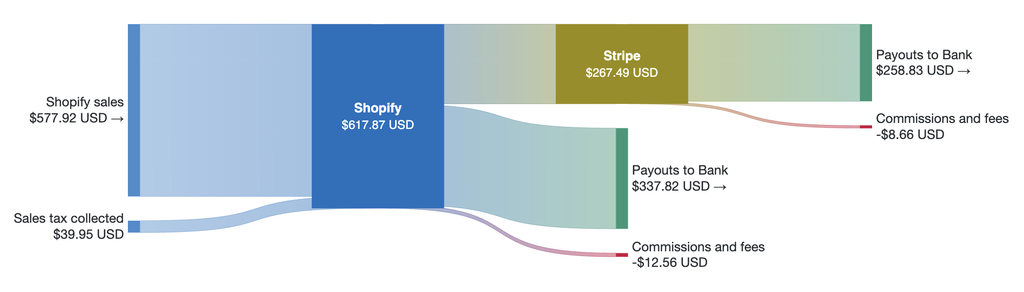
If you get paid through Shopify payments, it’s pretty straightforward.
- Your order total gets calculated based on the number of items bought, their prices, and any discounts that get applied. If there is any sales tax collected but not remitted for you, that gets included, as do any fees that get subtracted.
- The net amount from that order gets added to your Shopify payments account.
- When a payout is initiated, Shopify pulls the available funds out of your account and sends them to your designated bank.
- Within 1-2 business days, that deposit then shows up in your bank.
That’s already a number of steps with differing amounts. And this is the simple path – because the math is easy to trace at each step.
The sum total of all of your net orders will equal the total amount of your Shopify payout, which will equal the deposit in your bank account. In fact, Seller Ledger recently rolled out our new Money Flow feature to make viewing this super easy. Because we automatically match every Shopify order to its payout, and match payouts to bank deposits, you can click on any order/payout/bank deposit and see the full history of how that money moves.
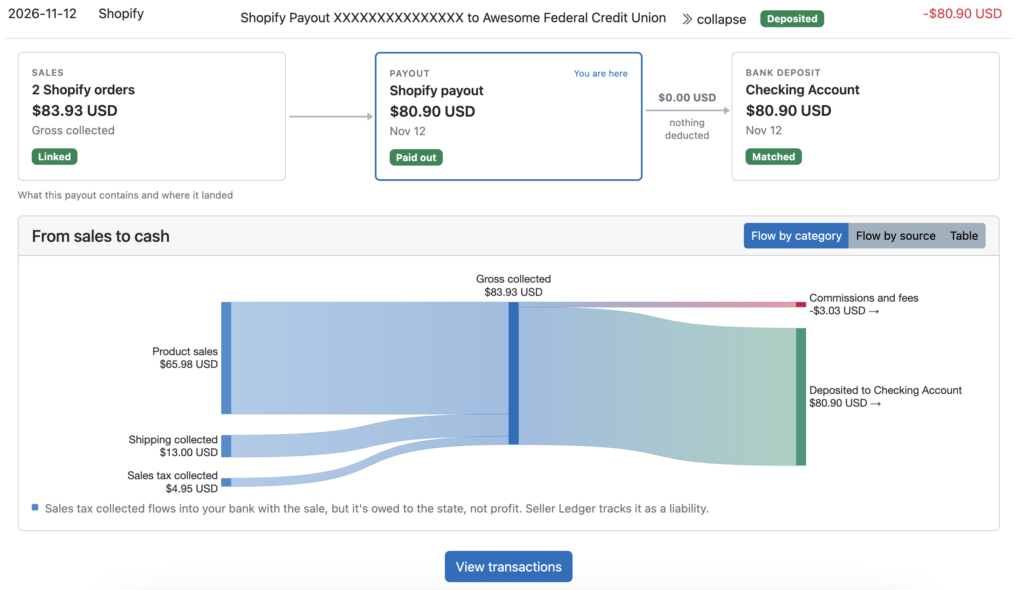
Click back and forth on the boxes of the top to see where the money started (e.g. the individual transactions) and where the money went (e.g. your matched bank deposit.)
What happens if a customer pays using another payment processor?
Now let’s take a look at a more complex scenario, but one that is incredibly common. Instead of using the default payment option, let’s say you have a customer with a Stripe Link account, and they use that to pay for the order on your Shopify store. Now the process gets even more convoluted:
- The same order calculation happens, except this time, Shopify just records the total amount.
- Stripe does the payment processing, and subtracts credit card and Stripe fees.
- The net amount is deposited to your Stripe account, not Shopify.
- Stripe then bundles all of your sales for the day (or several days if it’s a weekend) and sends a payout to your bank.
- Within the same 1-2 days, that payout gets deposited in your bank account.
But here’s why this gets messy. At each step, the numbers no longer match.
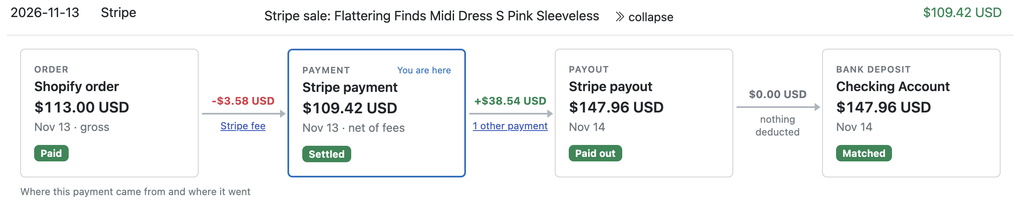
Because Shopify does not know about Stripe’s fees, their total for an order will not match the net amount of that same transaction in Stripe. And that means that Stripe’s payout to your bank will not match the sum of the orders in Shopify. This is the classic “order-to-cash” dilemma that has existed for ages – how do you track money from order all the way to your bank account when offering multiple payment options?
The solution
Fortunately, Seller Ledger now has a way to reconcile all of these numbers. By linking both your Shopify and Stripe account to Seller Ledger, we follow the money for you, tying each order to its payment, then each payment to its payouts, and that payout to the corresponding bank deposit.
Not just for Shopify
While Shopify (and other eCommerce store platforms) offer the most complex scenario to take advantage of this new money flow feature, other marketplace sellers also benefit. As we’ve written about before with eBay, Amazon and Walmart, we are able to tie every bank deposit all the way back to the underlying orders. Which allows you to see the same flow of money within any payout for those channels.
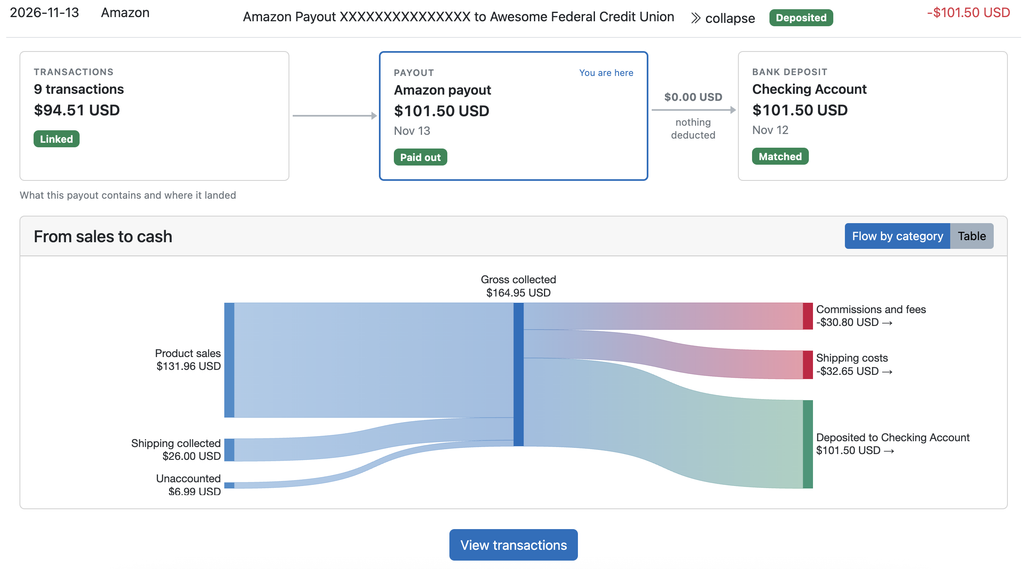
Note: these visualizations only work for platforms and marketplaces with data sources that provide the details to tie everything together. Platforms without APIs, like Whatnot, Poshmark, Mercari and Depop don’t support this level of reporting yet. Etsy is close, but not quite there.
Stay tuned for more updates as we roll into the 2026 tax season.
Ready to automate your eCommerce bookkeeping?
Join thousands of sellers who save hours every month with Seller Ledger.
No credit card required